Get short stories Web Page Design


Edit Template Offline
2. Create new page and search for id 6542728
Edit Template Online
Create Awesome Websites


Free Nicepage Builder
Keywords
The Split Introduction Leads Into a More Focused Signup Composition
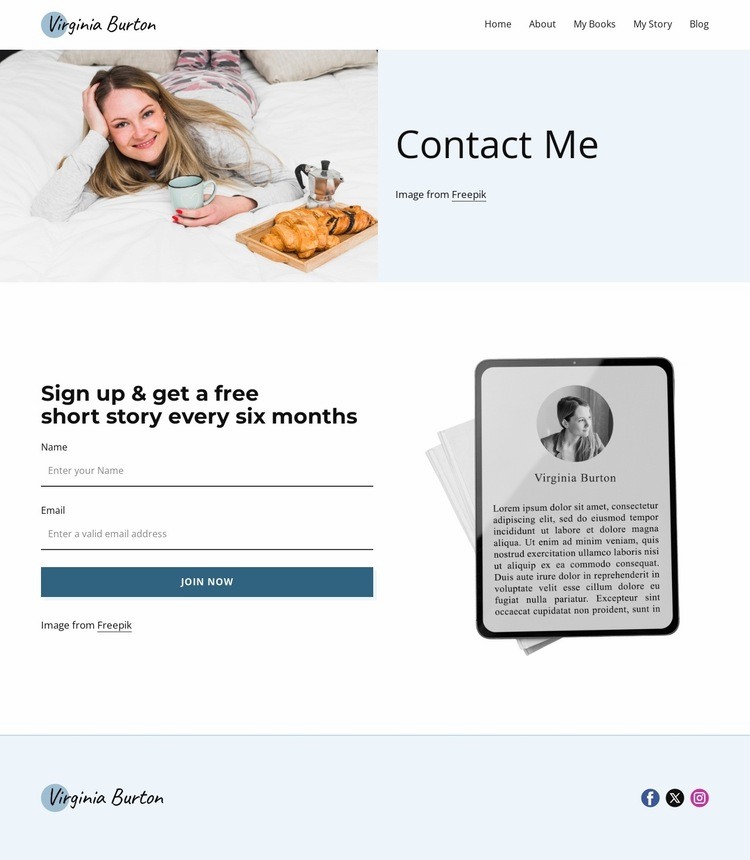
The page establishes its visual hierarchy through a sequence of changing content densities. The opening navigation is compact and horizontal, giving the author logo and five page links a clear shared line. Below it, the Contact Me section expands into a split composition: the large author image creates visual weight on one side, while the vertically centered heading and attribution text create a quieter reading zone on the other. This balance makes the introduction feel personal without filling the entire width with copy.
The next transition narrows the visitor’s attention toward the newsletter response. The signup section keeps the two-column pattern but changes the relationship between its parts: the form and Join Now action carry the functional emphasis on the left, while the reading illustration supports the story-related message on the right. The heading about receiving a free short story every six months gives the form a clear context before the fields are encountered. Spacious layouts, fine divider lines, dark charcoal type, and teal-blue action treatment help distinguish the sections without abrupt visual effects. The footer then reduces the composition again to a logo-and-links row, providing closure after the main interaction. As a web page design, the page works through controlled shifts between navigation, image-led introduction, focused form content, and compact social follow-up.
Customize with Nicepage
Open this ready-made template in the Web Page Design Builder and customize it visually in the Nicepage editor. Replace demo content, edit page sections, and adapt the design to your project without rebuilding the template from scratch.
Design a Web Page Section by Section
Choose a Design for Each Section
Build the page from individual content sections instead of starting with a fixed full-page layout. Use Block Designs to browse ready-made sections for different purposes, including introductions, services, galleries, testimonials, contact forms, pricing, and other common parts of a web page. Search or filter the available designs to find a layout that fits the content you want to add.
Combine Blocks and Page Elements
Add selected Blocks to the page and arrange them in the order that supports the page's purpose. A hero section can introduce the main message, followed by services, benefits, portfolio content, testimonials, calls to action, or contact information.
Inside each section, use Web Page Elements such as Text, Image, Hyperlink, Grid, Gallery, and other elements to build and present the page content. Individual elements can be added and adjusted within the Blocks, giving you more control over the composition of each section without having to create the complete layout from scratch.
Refine the Page Layout and Flow
After assembling the main sections, adjust their content, spacing, backgrounds, images, typography, and element placement in the Nicepage editor. Reorder Blocks when necessary and refine the transition from one section to the next so the information hierarchy and visual flow remain clear throughout the page.
This workflow makes the template useful as a web page design that can be composed from ready-made sections, customized with individual page elements, rearranged, and adapted to the content and purpose of an individual page.