Buy everything for your dog Web Page Design


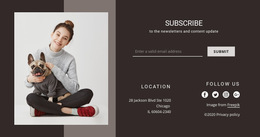
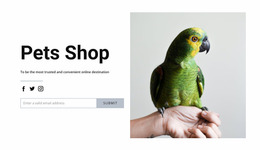
The Dog Photograph Anchors the Left-Side Subscription Column
The block’s page composition depends on a deliberate contrast in visual weight. The left column concentrates the heading, supporting sentence, three social-link icons, and email subscription form into one readable information area. The right column is dominated by a large dog photograph, which acts as an anchor and prevents the section from becoming a text-heavy response panel. This asymmetry gives the eye a clear route from the pet-themed heading toward the image while keeping the form available within the same section.
The internal hierarchy reinforces that movement. The bold serif heading is the first textual point of emphasis, the smaller sans-serif paragraph supplies context, and the social links and submit control provide secondary and direct actions below it. The light gray background gives both columns a shared frame, while muted teal accents help identify the interactive details. Generous whitespace separates the text from the photograph and preserves a calm transition into neighboring page content.
As one unit in a web page, the section can work near an introduction, newsletter invitation, or other pet-related content without carrying the entire page structure. Its strongest compositional value is the pairing of a concise left-side message with a single high-impact image. Nicepage’s Block Designs can provide surrounding section options, while this block retains its own spatial role within the page.
Customize with Nicepage
Open this ready-made template in the Web Page Design Builder and customize it visually in the Nicepage editor. Replace demo content, edit page sections, and adapt the design to your project without rebuilding the template from scratch.
Edit Template Offline
2. Create a new page or select existing
3. Click Add new block, search for id 135882 and click enter
Edit Template Online
Create Awesome Websites


Free Nicepage Builder
Keywords
Design a Web Page With This Block as One Section
Place the Block in the Page Composition
Use Block Designs to combine individual sections into a complete page. The analyzed block contributes one part of that composition, while other sections can handle the introduction, services, proof, portfolio, pricing, contact, or other page-level needs.
Refine the Elements Inside the Block
Use Web Page Elements such as Text, Image, Hyperlink, Grid, Gallery, and other elements to refine the section's content. Adjust the existing elements without assuming that one block must carry the entire page structure.
Balance the Section With Neighboring Content
After the block is placed, refine its spacing, image scale, text density, alignment, and background treatment so the transition into and out of the section feels intentional. Reorder Blocks at the page level when necessary while keeping the internal composition of each section coherent.
This workflow treats the block as one compositional unit in a web page: internally designed, visually distinct, and coordinated with the sections around it.