Online Education Tutorial One Page Template


Edit Template Offline
2. Create new page and search for id 6673153
Edit Template Online
Create Awesome Websites


Free Nicepage Builder
Keywords
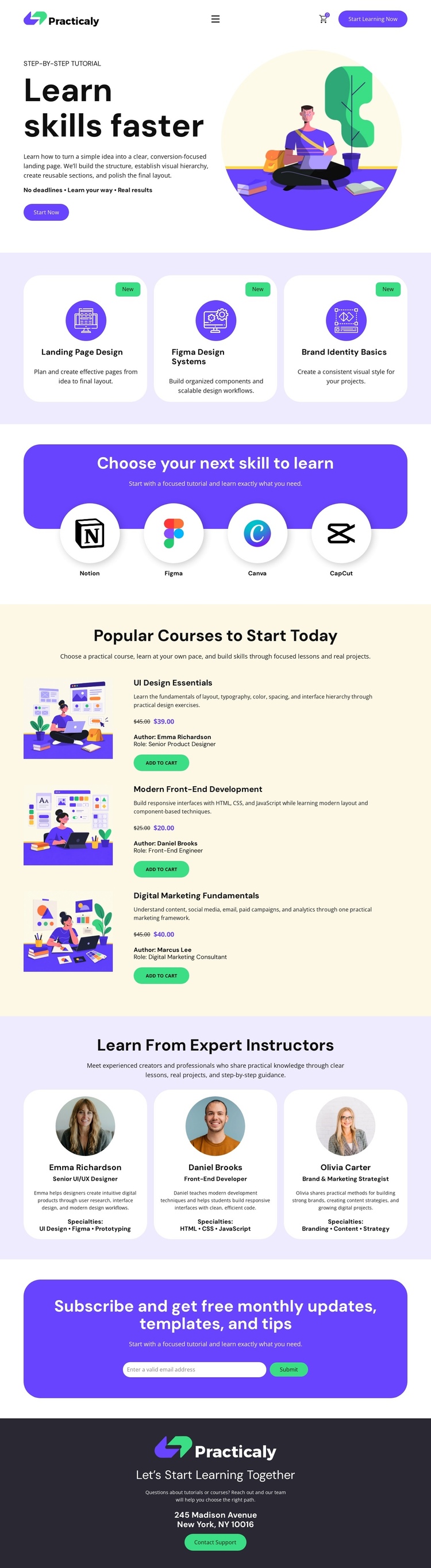
Seven learning sections create a continuous content journey
The page has a natural one-page sequence because each major section answers a different question in the learning journey. The opening block explains the offer through the “Learn skills faster” heading, supporting illustration, and Start Now action. Three category cards then give visitors an initial set of learning destinations, followed by the four-tool section that identifies the practical platforms connected with the subject matter.
The course section becomes the central destination within the sequence. Its three vertically stacked listings provide a substantial area for comparing UI Design Essentials, Modern Front-End Development, and Digital Marketing Fundamentals through descriptions, authors, prices, illustrations, and Add to Cart controls. The instructor section changes the rhythm from course choice to expertise, using three profile cards with portraits, roles, biographies, and specialties. This makes the page feel like several meaningful content areas within one document rather than a single promotional panel repeated downward.
The subscription section and footer supply the final destinations. The email form invites visitors to continue receiving learning resources, while the dark closing area combines brand identity, a learning message, contact information, and support access. These boundaries can guide menu labels or scrolling decisions if navigation is added later, but the analysis does not establish that anchor navigation already exists. Nicepage’s Menu For One-Page Site documentation is relevant only as a possible bridge for connecting such destinations during implementation.
Customize with Nicepage
Open this ready-made template in the One Page Template Builder and customize it visually in the Nicepage editor. Replace demo content, edit page sections, and adapt the design to your project without rebuilding the template from scratch.
Build a Navigable One-Page Website
Connect the Menu to Page Sections
Organize the website as a sequence of sections on a single page and use the Menu For One-Page Site to connect menu items with individual page Blocks. Visitors can jump directly to sections such as About, Services, Testimonials, or Contact without opening separate pages.
Keep the Website on One URL
A one-page template can combine several parts of a small website within one continuous page. Arrange the Header, introduction, services, portfolio, company information, reviews, contact details, and other relevant sections in the order that fits the project while keeping them accessible through the same page navigation.
Make Long Pages Easier to Navigate
For longer one-page websites, keep navigation labels short and connected to meaningful sections so visitors can move through the page without relying only on scrolling. You can also use the Back To Top element to provide a quick way back to the beginning after longer sections.
This workflow makes the template suitable for compact websites that need several distinct content sections while keeping the complete visitor experience on one URL.