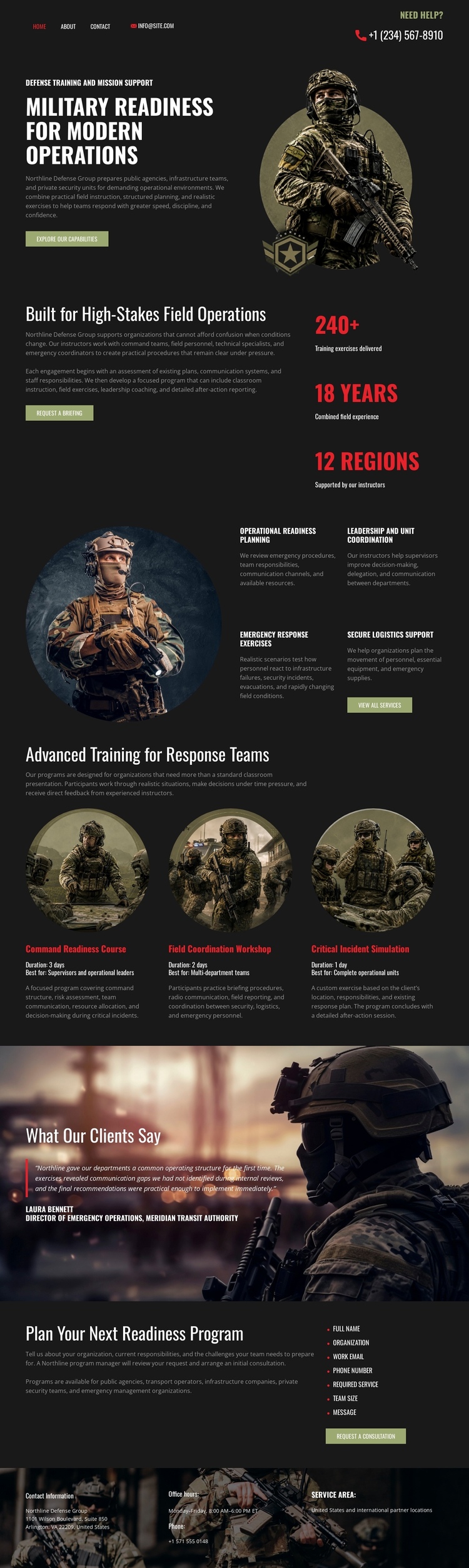
Modern Military Defense One Page Template


Edit Template Offline
2. Create new page and search for id 6663841
Edit Template Online
Create Awesome Websites


Free Nicepage Builder
Keywords
Seven Sections Create a Continuous Readiness Information Journey
The page has enough distinct content zones to support a meaningful single-document journey. It begins with the military readiness message and a large personnel image, then moves into an operational overview where explanatory text sits beside highlighted metrics. That transition takes the visitor from the subject of the page to a concise account of capability and reach. The next features section expands the information through planning, leadership coordination, emergency response exercises, and specialized equipment.
The three advanced-training cards form another recognizable destination within the same document. Their equal image-led treatment separates detailed capability choices from the broader operational explanation. A full-width testimonial banner follows, creating a visual pause and a dedicated place for client-oriented evidence. The final readiness-program block then gathers the page into a practical consultation request, while the footer provides compact links and service-area information.
This order supports one-page navigation because the sections represent different information destinations: introduction, operational overview, capabilities, advanced training, client perspective, program planning, and footer resources. The analysis verifies navigation as a component, but it does not prove that anchor links already exist. Nicepage’s Menu For One-Page Site capability could later connect these real sections if needed; the current design itself supplies the content sequence that makes such navigation meaningful.
Customize with Nicepage
Open this ready-made template in the One Page Template Builder and customize it visually in the Nicepage editor. Replace demo content, edit page sections, and adapt the design to your project without rebuilding the template from scratch.
Build a Navigable One-Page Website
Connect the Menu to Page Sections
Organize the website as a sequence of sections on a single page and use the Menu For One-Page Site to connect menu items with individual page Blocks. Visitors can jump directly to sections such as About, Services, Testimonials, or Contact without opening separate pages.
Keep the Website on One URL
A one-page template can combine several parts of a small website within one continuous page. Arrange the Header, introduction, services, portfolio, company information, reviews, contact details, and other relevant sections in the order that fits the project while keeping them accessible through the same page navigation.
Make Long Pages Easier to Navigate
For longer one-page websites, keep navigation labels short and connected to meaningful sections so visitors can move through the page without relying only on scrolling. You can also use the Back To Top element to provide a quick way back to the beginning after longer sections.
This workflow makes the template suitable for compact websites that need several distinct content sections while keeping the complete visitor experience on one URL.