International language school One Page Template


Edit Template Offline
2. Create new page and search for id 18696
Edit Template Online
Create Awesome Websites


Free Nicepage Builder
Keywords
Distinct Course Destinations Form a Continuous Learning Journey
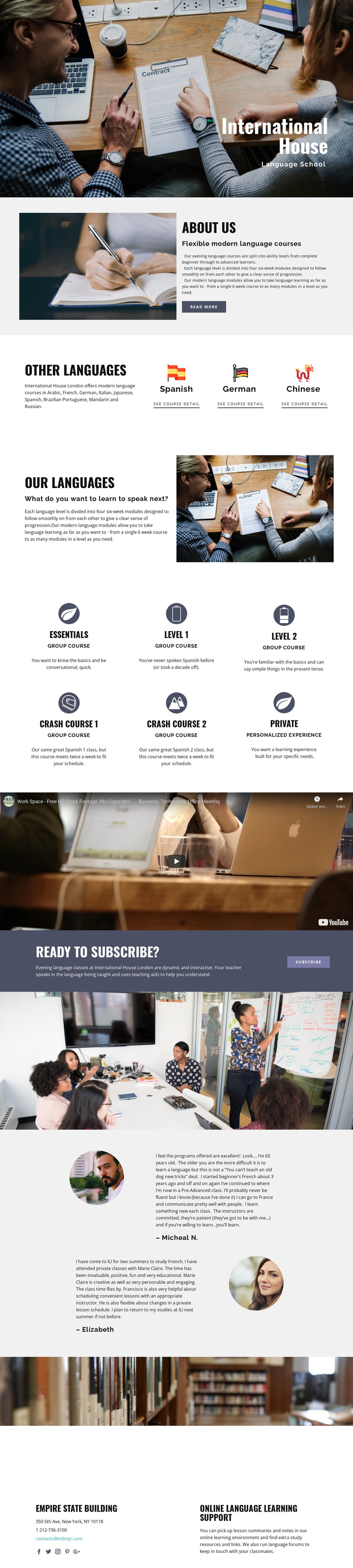
The page is naturally divided into several meaningful destinations within one long document. The hero introduces the school, while the about section provides the first explanatory stop by describing flexible evening courses and progression through ability levels. The Other Languages area then narrows attention to language choices, and the larger language-program section explains the modular approach in a separate context beside classroom photography.
The six course descriptions create the central information destination. Essentials, crash courses, level references, group learning, and private study can be explored as related options without leaving the page. The video block provides a distinct media pause, followed by the “Ready to subscribe?” callout as a separate enrollment destination. These transitions support navigation by content purpose: introduction, program choice, course format, learning media, and response.
The supporting image, testimonials, and contact region extend the page rather than interrupting it with unrelated routes. Two learner-oriented testimonial blocks add a reassurance destination, while the final contact area combines communication details with online language learning support and forums. The sample address and names should be replaced as project content, but their structural roles remain clear. The result is a coherent one-page information architecture where visitors can move through several subjects while staying within one continuous language-school experience.
Customize with Nicepage
Open this ready-made template in the One Page Template Builder and customize it visually in the Nicepage editor. Replace demo content, edit page sections, and adapt the design to your project without rebuilding the template from scratch.
Build a Navigable One-Page Website
Connect the Menu to Page Sections
Organize the website as a sequence of sections on a single page and use the Menu For One-Page Site to connect menu items with individual page Blocks. Visitors can jump directly to sections such as About, Services, Testimonials, or Contact without opening separate pages.
Keep the Website on One URL
A one-page template can combine several parts of a small website within one continuous page. Arrange the Header, introduction, services, portfolio, company information, reviews, contact details, and other relevant sections in the order that fits the project while keeping them accessible through the same page navigation.
Make Long Pages Easier to Navigate
For longer one-page websites, keep navigation labels short and connected to meaningful sections so visitors can move through the page without relying only on scrolling. You can also use the Back To Top element to provide a quick way back to the beginning after longer sections.
This workflow makes the template suitable for compact websites that need several distinct content sections while keeping the complete visitor experience on one URL.