Music Festivals One Page Template


Edit Template Offline
2. Create new page and search for id 21755
Edit Template Online
Create Awesome Websites


Free Nicepage Builder
Keywords
From Festival Introduction to Contact, the Sections Form One Journey
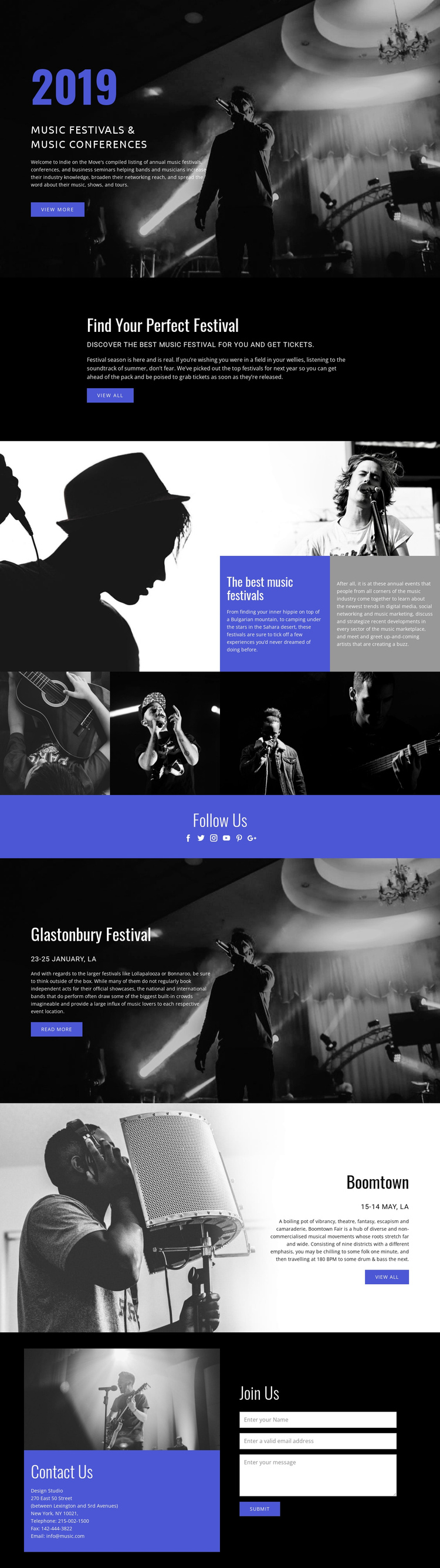
The page’s section order supports a continuous content journey. The opening Music Festivals & Music Conferences hero introduces the guide through a large concert image, a short description, and a View more action. Rather than ending the introduction there, the following Find Your Perfect Festival block creates a distinct discovery destination with its own explanatory text and View all button.
The middle sections provide progressively different ways to explore the subject. A split composition pairs large and smaller musician photographs with two contrasting text panels, then a horizontal row of four concert images creates a visual showcase. The indigo Follow Us band works as another identifiable stop, using six social-network icons to separate community-oriented content from the festival information around it.
The Glastonbury Festival and Boomtown panels function as named event destinations within the same document. Their image-led layouts, date lines, descriptions, and actions give visitors reasons to move through the page instead of encountering an undifferentiated block of text. At the end, Contact Us and Join Us bring contact information and the name, email, and message form fields together. The sequence supports multiple content destinations on one page, while the final form serves as the closing interaction rather than defining the entire page as a single-purpose conversion funnel.
Customize with Nicepage
Open this ready-made template in the One Page Template Builder and customize it visually in the Nicepage editor. Replace demo content, edit page sections, and adapt the design to your project without rebuilding the template from scratch.
Build a Navigable One-Page Website
Connect the Menu to Page Sections
Organize the website as a sequence of sections on a single page and use the Menu For One-Page Site to connect menu items with individual page Blocks. Visitors can jump directly to sections such as About, Services, Testimonials, or Contact without opening separate pages.
Keep the Website on One URL
A one-page template can combine several parts of a small website within one continuous page. Arrange the Header, introduction, services, portfolio, company information, reviews, contact details, and other relevant sections in the order that fits the project while keeping them accessible through the same page navigation.
Make Long Pages Easier to Navigate
For longer one-page websites, keep navigation labels short and connected to meaningful sections so visitors can move through the page without relying only on scrolling. You can also use the Back To Top element to provide a quick way back to the beginning after longer sections.
This workflow makes the template suitable for compact websites that need several distinct content sections while keeping the complete visitor experience on one URL.