Video Technology One Page Template


Edit Template Offline
2. Create new page and search for id 12863
Edit Template Online
Create Awesome Websites


Free Nicepage Builder
Keywords
Distinct Recommendation Destinations Keep the Long Page Coherent
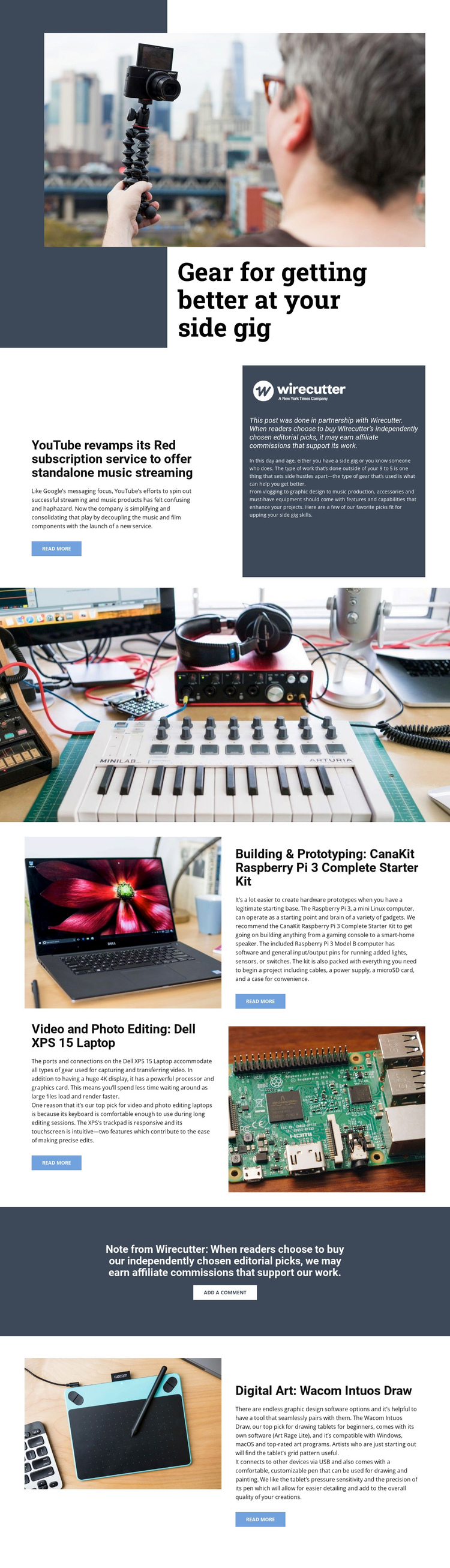
The page’s sections form a practical content journey without requiring the guide to be divided into separate documents. Visitors first encounter the broad side-gig theme in the image-led hero, then move to the YouTube Red article and its adjacent Wirecutter disclosure. The full-width photographic band creates a noticeable break between that introduction and the recommendation content, helping the continuous page avoid a flat succession of text blocks.
The central recommendation area contains two distinct information destinations. Video and photo editing is represented by the Dell XPS 15 Laptop, while building and prototyping is represented by the CanaKit Raspberry Pi 3 Complete Starter Kit. Their alternating image-and-copy blocks make the categories visually recognizable as visitors move through the page. The later Digital Art section gives the Wacom Intuos Draw its own final destination rather than placing all products into one crowded group.
The affiliate disclosure and add-a-comment action provide another meaningful stop in the sequence before the final product section. Read-more links can connect each recommendation to extended information, while the existing headings supply natural labels for navigation if a one-page menu is later introduced. The design therefore supports several content destinations within one continuous editorial document, with progression driven by topic rather than by a single conversion step.
Customize with Nicepage
Open this ready-made template in the One Page Template Builder and customize it visually in the Nicepage editor. Replace demo content, edit page sections, and adapt the design to your project without rebuilding the template from scratch.
Build a Navigable One-Page Website
Connect the Menu to Page Sections
Organize the website as a sequence of sections on a single page and use the Menu For One-Page Site to connect menu items with individual page Blocks. Visitors can jump directly to sections such as About, Services, Testimonials, or Contact without opening separate pages.
Keep the Website on One URL
A one-page template can combine several parts of a small website within one continuous page. Arrange the Header, introduction, services, portfolio, company information, reviews, contact details, and other relevant sections in the order that fits the project while keeping them accessible through the same page navigation.
Make Long Pages Easier to Navigate
For longer one-page websites, keep navigation labels short and connected to meaningful sections so visitors can move through the page without relying only on scrolling. You can also use the Back To Top element to provide a quick way back to the beginning after longer sections.
This workflow makes the template suitable for compact websites that need several distinct content sections while keeping the complete visitor experience on one URL.