Legendary Sounds Landing Page



Edit Template Offline
2. Create new page and search for id 24176
Edit Template Online
Create Awesome Websites


Free Nicepage Builder
Keywords
From Global Beatles Day to Further Reading
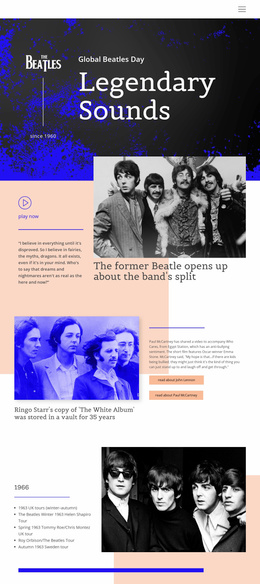
The hero establishes the subject immediately through the Beatles logo, the Global Beatles Day marker, the since-1960 label, and the Legendary Sounds title. From there, the page uses a sequence of increasingly specific information to sustain attention: a featured story about the band’s split, artist-focused biography links, and a tour chronology covering 1963 through 1966. The arrangement gives readers a clear reason to continue without treating every section as an isolated topic.
The Yellow Submarine feature provides a strong middle-page change of emphasis. Its song commentary, Lennon–McCartney attribution, and lyrics shift the experience from historical chronology to musical interpretation. The awards and achievements section then supplies a concise legacy-focused summary beside a large Beatles image. These sections work as supporting proof and depth for readers who have already entered through the broad hero statement.
The design does not verify a single primary conversion goal, so its strongest landing-page interpretation is an editorial response path rather than a sales funnel. The available actions—play now, read about John Lennon, read about Paul McCartney, and read more—can guide visitors toward deeper stories or media content. The Beatles Quotes carousel adds a memorable final engagement point before the closing fact statement and branded footer. This sequence keeps exploration focused on the same subject while leaving the final action open to the project’s confirmed content needs.
Customize with Nicepage
Open this ready-made template in the Landing Page Builder and customize it visually in the Nicepage editor. Replace demo content, edit page sections, and adapt the design to your project without rebuilding the template from scratch.
Build a Landing Page Around One Conversion Goal
Focus on One Primary Action
Use the landing page to guide visitors toward one measurable response, such as requesting a quote, registering, subscribing, booking a consultation, applying for a service, or submitting an inquiry. Keep the primary call-to-action consistent across the important sections so the headline, supporting content, form, and CTA buttons work toward the same campaign goal instead of competing for attention.
Capture Leads With a Form
Use the Contact Form Element to add a contact, subscription, application, or other conversion form directly to the landing page. Customize the form fields, layout, labels, inputs, and button to collect the information required for your campaign while keeping the form focused on the action you want visitors to complete.
Nicepage also provides several form submission options. Form submissions can be sent to Email, stored as Leads, added to Google Sheets, passed to a custom URL or server endpoint, or used to populate a MailChimp mailing list. This provides practical options for collecting inquiries, registrations, subscriptions, applications, and other campaign responses.
Manage Leads and Campaign Responses
When submissions are stored as Leads, you can use Contact Form Leads to review the information collected through the landing page and use it for follow-up. Keep the form connected to the same offer and primary CTA presented throughout the page so visitors move from the campaign message to a clear conversion action.
This workflow makes the template suitable for landing pages where the offer, content, call-to-action, form, and lead collection process work together toward one defined conversion goal.

More from Music & Entertainment Landing Pages
-
Free Website Builder SoftwareDownload