Future technology Landing Page


Edit Template Offline
2. Create new page and search for id 18337
Edit Template Online
Create Awesome Websites


Free Nicepage Builder
Keywords
The Robotic Hero Opens a Path Through Technology Stories
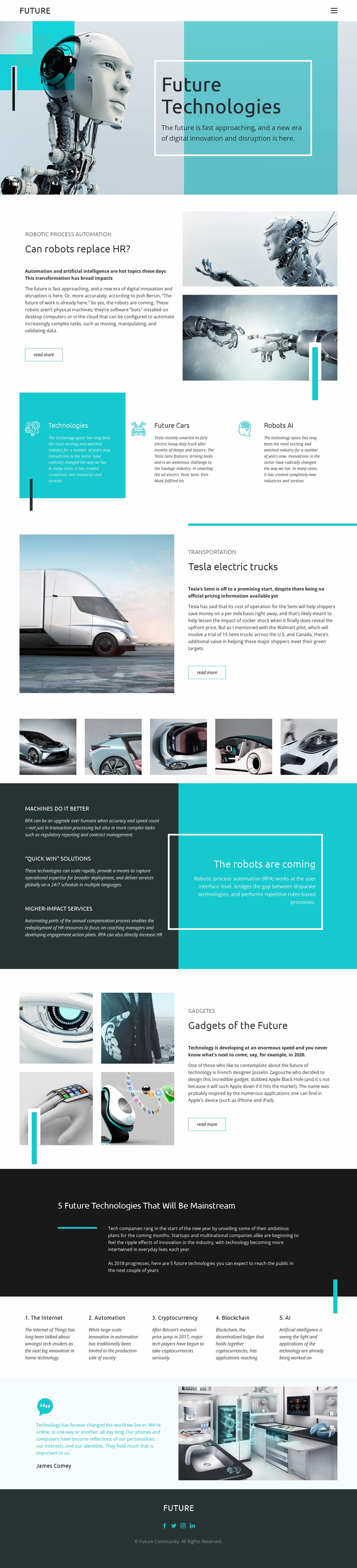
The robotic hero establishes the subject immediately with the title “Future Technologies” and a turquoise-accented editorial panel. From that opening, the page can guide readers through increasingly specific topics: robotic process automation introduces the effect of technology on repetitive work, the Tesla electric truck section shifts attention to transportation, and the gadget feature widens the discussion to consumer-facing innovation.
The three category panels help visitors choose a direction without interrupting the overall story. Technologies, Future Cars, and Robots AI act as concise topic signals, while the five-image vehicle gallery reinforces the transportation thread visually. The dark automation section then adds a clearer benefit-oriented emphasis through “MACHINES DO IT BETTER,” “QUICK WIN” SOLUTIONS, and HIGHER-IMPACT SERVICES. Together, these sections create a progression from broad interest to more focused article exploration.
The “read more” actions are the page’s clearest response points, and the later five-topic list offers another route into related editorial subjects: the Internet, automation, cryptocurrency, blockchain, and AI. Because no single form, purchase, registration, or other primary conversion action is verified, the page is best interpreted conservatively as encouraging article exploration rather than promising a defined lead-generation funnel.
Customize with Nicepage
Open this ready-made template in the Landing Page Builder and customize it visually in the Nicepage editor. Replace demo content, edit page sections, and adapt the design to your project without rebuilding the template from scratch.
Build a Landing Page Around One Conversion Goal
Focus on One Primary Action
Use the landing page to guide visitors toward one measurable response, such as requesting a quote, registering, subscribing, booking a consultation, applying for a service, or submitting an inquiry. Keep the primary call-to-action consistent across the important sections so the headline, supporting content, form, and CTA buttons work toward the same campaign goal instead of competing for attention.
Capture Leads With a Form
Use the Contact Form Element to add a contact, subscription, application, or other conversion form directly to the landing page. Customize the form fields, layout, labels, inputs, and button to collect the information required for your campaign while keeping the form focused on the action you want visitors to complete.
Nicepage also provides several form submission options. Form submissions can be sent to Email, stored as Leads, added to Google Sheets, passed to a custom URL or server endpoint, or used to populate a MailChimp mailing list. This provides practical options for collecting inquiries, registrations, subscriptions, applications, and other campaign responses.
Manage Leads and Campaign Responses
When submissions are stored as Leads, you can use Contact Form Leads to review the information collected through the landing page and use it for follow-up. Keep the form connected to the same offer and primary CTA presented throughout the page so visitors move from the campaign message to a clear conversion action.
This workflow makes the template suitable for landing pages where the offer, content, call-to-action, form, and lead collection process work together toward one defined conversion goal.

More from Technology Landing Pages
-
Free Website Builder SoftwareDownload