Travel on Seaboat Landing Page


Edit Template Offline
2. Create new page and search for id 12435
Edit Template Online
Create Awesome Websites


Free Nicepage Builder
Keywords
The marine hero and service sequence build toward a Call Us response
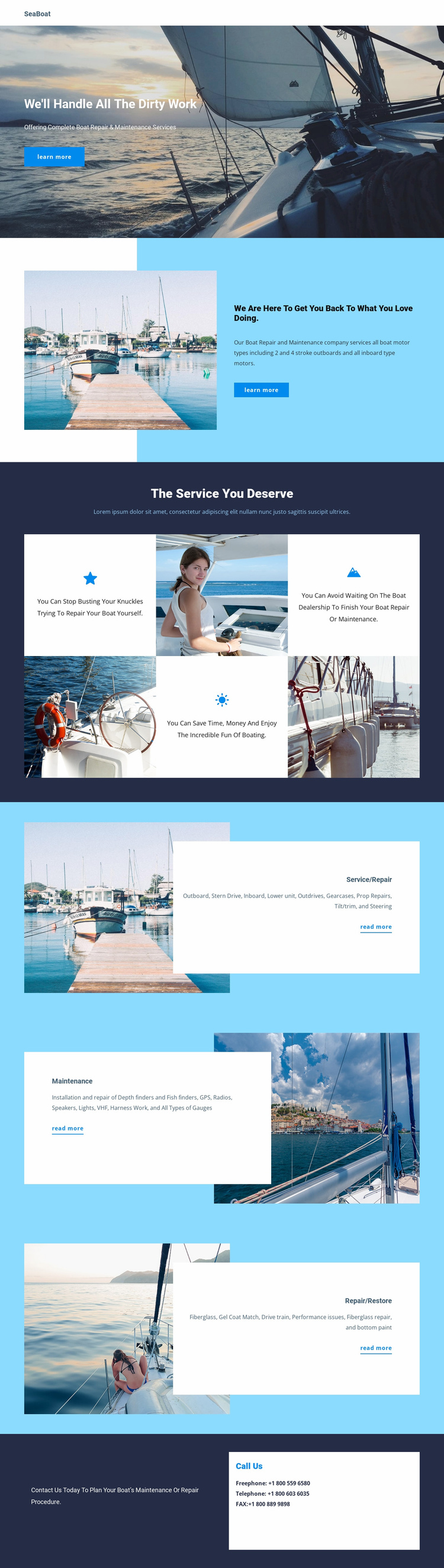
The opening hero gives the page a direct starting point: marine imagery establishes the boating context, the headline frames the service problem, and the Learn more button offers an initial response. The next image-and-text section strengthens that message by connecting boat motor service with the desired outcome of getting owners back to what they love doing. This creates a progression from recognition to service relevance before the detailed categories appear.
The four benefit statements work as supporting reassurance, while the three named service areas answer different questions a potential customer may have. Service/Repair covers motor and mechanical needs, including outboard and inboard work, propeller repairs, tilt and trim, steering, and gauges. Maintenance extends the path into equipment such as depth finders, GPS, radios, speakers, and lights. Repair/Restore adds fiberglass, gel coat matching, and bottom-paint-related restoration context. The final dark contact section, headed Call Us, gives the visitor a distinct response point rather than ending after the service descriptions. Since the analysis verifies a phone-contact channel but not a single exclusive commercial offer, the design supports a conservative inquiry or service-information landing path rather than an invented booking or purchase funnel.
Customize with Nicepage
Open this ready-made template in the Landing Page Builder and customize it visually in the Nicepage editor. Replace demo content, edit page sections, and adapt the design to your project without rebuilding the template from scratch.
Build a Landing Page Around One Conversion Goal
Focus on One Primary Action
Use the landing page to guide visitors toward one measurable response, such as requesting a quote, registering, subscribing, booking a consultation, applying for a service, or submitting an inquiry. Keep the primary call-to-action consistent across the important sections so the headline, supporting content, form, and CTA buttons work toward the same campaign goal instead of competing for attention.
Capture Leads With a Form
Use the Contact Form Element to add a contact, subscription, application, or other conversion form directly to the landing page. Customize the form fields, layout, labels, inputs, and button to collect the information required for your campaign while keeping the form focused on the action you want visitors to complete.
Nicepage also provides several form submission options. Form submissions can be sent to Email, stored as Leads, added to Google Sheets, passed to a custom URL or server endpoint, or used to populate a MailChimp mailing list. This provides practical options for collecting inquiries, registrations, subscriptions, applications, and other campaign responses.
Manage Leads and Campaign Responses
When submissions are stored as Leads, you can use Contact Form Leads to review the information collected through the landing page and use it for follow-up. Keep the form connected to the same offer and primary CTA presented throughout the page so visitors move from the campaign message to a clear conversion action.
This workflow makes the template suitable for landing pages where the offer, content, call-to-action, form, and lead collection process work together toward one defined conversion goal.

More from Travel & Hotels Landing Pages
-
Free Website Builder SoftwareDownload