Poetry Book and Author Joomla Template


Edit Template Offline
2. Create new page and search for id 6660182
Edit Template Online
Create Awesome Websites


Free Nicepage Builder
Keywords
Biography, Literary Work, and Events Form Structured CMS Content Areas
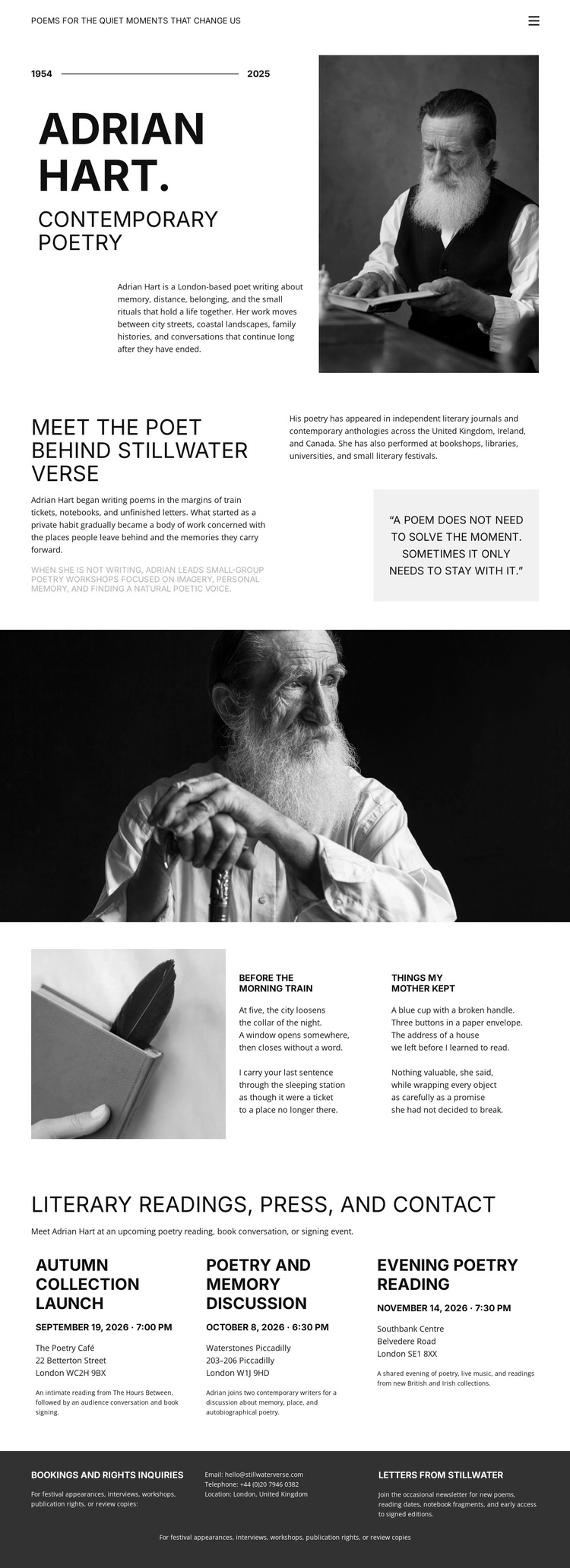
The design divides the poet’s material into content areas that can remain distinct within a CMS-managed Joomla site. The opening profile provides stable author information through the contemporary poetry heading, portrait, date line, and biography. The following Meet the Poet section adds a second layer of biographical and statement-based content, including a highlighted quotation. Together, these sections establish the author region before visitors reach the more changeable literary material.
The two named excerpts, Before the Morning Train and Things My Mother Kept, form a separate writing area beside an image associated with the act of writing. This separation helps a Joomla project treat poetry samples as their own structured content region rather than mixing them into the biography. Farther down, the Literary Readings, Press, and Contact heading introduces three repeated items: Autumn Collection, Poetry and Memory Discussions, and Evening Poetry Reading. Those items provide a natural region for organized information about collections, discussions, readings, and contact-related activity.
The dark footer adds a shared-looking closing area for booking and notes information and Letters from Stillwater content. In a Joomla implementation, these regions can support an organized relationship between navigation, author information, literary material, public events, and contact content. The design’s value is therefore in how its real sections separate recurring informational subjects while keeping them visually coordinated.
Customize with Nicepage
Open this ready-made template in the Joomla Page Builder and customize it visually in the Nicepage editor. Replace demo content, edit page sections, and adapt the design to your project without rebuilding the template from scratch.
Work With This Template in Joomla
Customize and Install the Joomla Template
Start with this ready-made template instead of building the Joomla design from scratch. Customize its layout, content, typography, images, sections, and other design elements visually in the Nicepage application, then export and install the Joomla Template, Nicepage Extension, and supported content on your Joomla website.
Edit the Template Directly in Joomla
After installation, you can edit the Joomla Template directly in Joomla with the Nicepage Joomla Extension. Customize the Header, Footer, Colors, Fonts, typography, and Page Templates from the Joomla workflow while keeping the site design connected with your CMS content.
Edit Joomla Articles Visually
Use the Nicepage Joomla Extension to open and edit Joomla Articles visually from the Joomla Administrator. Change text, images, sections, layouts, and other page content in the Nicepage editor while continuing to manage the Articles through Joomla.
Joomla Content and Template Integration
Use the customized template together with Joomla Articles, module Positions, menus, forms, Blog Pages, and other supported CMS elements. With the Nicepage Extension used as the Site Style Source, shared design settings can be applied across Joomla Articles while Joomla continues to provide the CMS environment for managing site content.
This workflow combines a ready-made Joomla Template with visual customization, direct template editing in Joomla, and continued content management through the Nicepage Joomla Extension.