Dictionary Translation Agency Joomla Template


Edit Template Offline
2. Create new page and search for id 6653528
Edit Template Online
Create Awesome Websites


Free Nicepage Builder
Keywords
Service Categories and Reusable Contact Regions
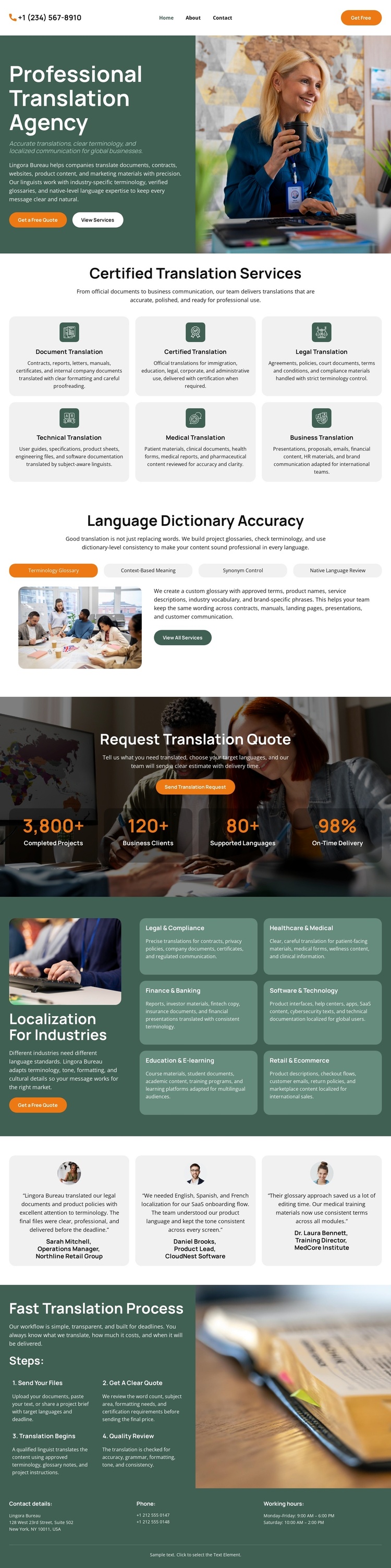
The six translation cards divide the page into clear informational areas for document, certified, legal, technical, medical, and business services. That grouping can support a CMS-managed content structure because each category has a defined visual position within the broader agency page. The separate localization group performs a similar role for legal and compliance, healthcare and medical, finance and banking, software and technology, education and e-learning, and retail and ecommerce. These two card systems distinguish general translation offerings from sector-specific localization content.
The navigation, repeated service regions, testimonial row, quote banner, and closing contact area give the design several recognizable site regions rather than one undifferentiated text block. The three-step translation process can remain a structured explanatory area near contact information, while the accuracy sections provide supporting editorial content between the card groups. In a Joomla project, this arrangement can accommodate CMS-managed service and informational content while preserving the visual relationship between shared sections and repeated items. The displayed figures, phone information, and testimonial attributions should be replaced or verified independently; they demonstrate content structure but do not establish real business claims. The result is a Joomla-oriented content foundation based on this design's actual regions, not on CMS terminology alone.
Customize with Nicepage
Open this ready-made template in the Joomla Page Builder and customize it visually in the Nicepage editor. Replace demo content, edit page sections, and adapt the design to your project without rebuilding the template from scratch.
Work With This Template in Joomla
Customize and Install the Joomla Template
Start with this ready-made template instead of building the Joomla design from scratch. Customize its layout, content, typography, images, sections, and other design elements visually in the Nicepage application, then export and install the Joomla Template, Nicepage Extension, and supported content on your Joomla website.
Edit the Template Directly in Joomla
After installation, you can edit the Joomla Template directly in Joomla with the Nicepage Joomla Extension. Customize the Header, Footer, Colors, Fonts, typography, and Page Templates from the Joomla workflow while keeping the site design connected with your CMS content.
Edit Joomla Articles Visually
Use the Nicepage Joomla Extension to open and edit Joomla Articles visually from the Joomla Administrator. Change text, images, sections, layouts, and other page content in the Nicepage editor while continuing to manage the Articles through Joomla.
Joomla Content and Template Integration
Use the customized template together with Joomla Articles, module Positions, menus, forms, Blog Pages, and other supported CMS elements. With the Nicepage Extension used as the Site Style Source, shared design settings can be applied across Joomla Articles while Joomla continues to provide the CMS environment for managing site content.
This workflow combines a ready-made Joomla Template with visual customization, direct template editing in Joomla, and continued content management through the Nicepage Joomla Extension.