Deals and Discounts Joomla Template



Edit Template Offline
2. Create new page and search for id 6633092
Edit Template Online
Create Awesome Websites


Free Nicepage Builder
Keywords
Brand, Category, and Offer Regions Suit Managed Joomla Content
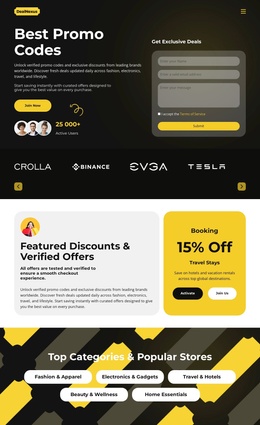
The four-brand strip, five shopping categories, and repeated offer cards divide the design into content regions that can be maintained separately in a CMS-oriented project. The brand area provides a concise introductory set of displayed marks, while the category pills create a broader navigation-like grouping for Fashion & Apparel, Electronics & Gadgets, Travel & Hotels, Beauty & Wellness, and Home Essentials. These relationships are more useful for structured site content than treating the page as one uninterrupted promotion.
The Featured Discounts & Verified Offers and Trending Deals & Limited Offers sections use recurring card patterns. Their displayed retailer names, discount labels, descriptions, and actions can be understood as repeatable informational units, while the three redemption cards provide a separate instructional sequence. The yellow testimonial band and shared dark surfaces help these regions remain visually connected even when their content roles differ.
The subscription-oriented hero panel and closing signup area add contact-oriented regions around the informational content. In a Joomla project, those areas can remain part of the same visual system while editorial offer details, brand entries, categories, and supporting messages are managed through the site structure. The design therefore maps naturally to a CMS arrangement of menus, recurring content areas, promotional items, and shared page regions without claiming that specific Joomla articles or modules already exist.
Customize with Nicepage
Open this ready-made template in the Joomla Page Builder and customize it visually in the Nicepage editor. Replace demo content, edit page sections, and adapt the design to your project without rebuilding the template from scratch.
Work With This Template in Joomla
Customize and Install the Joomla Template
Start with this ready-made template instead of building the Joomla design from scratch. Customize its layout, content, typography, images, sections, and other design elements visually in the Nicepage application, then export and install the Joomla Template, Nicepage Extension, and supported content on your Joomla website.
Edit the Template Directly in Joomla
After installation, you can edit the Joomla Template directly in Joomla with the Nicepage Joomla Extension. Customize the Header, Footer, Colors, Fonts, typography, and Page Templates from the Joomla workflow while keeping the site design connected with your CMS content.
Edit Joomla Articles Visually
Use the Nicepage Joomla Extension to open and edit Joomla Articles visually from the Joomla Administrator. Change text, images, sections, layouts, and other page content in the Nicepage editor while continuing to manage the Articles through Joomla.
Joomla Content and Template Integration
Use the customized template together with Joomla Articles, module Positions, menus, forms, Blog Pages, and other supported CMS elements. With the Nicepage Extension used as the Site Style Source, shared design settings can be applied across Joomla Articles while Joomla continues to provide the CMS environment for managing site content.
This workflow combines a ready-made Joomla Template with visual customization, direct template editing in Joomla, and continued content management through the Nicepage Joomla Extension.