Creative Summit Event Joomla Template


Edit Template Offline
2. Create new page and search for id 6626618
Edit Template Online
Create Awesome Websites


Free Nicepage Builder
Keywords
Topic Groups and Agenda Regions for Managed Event Content
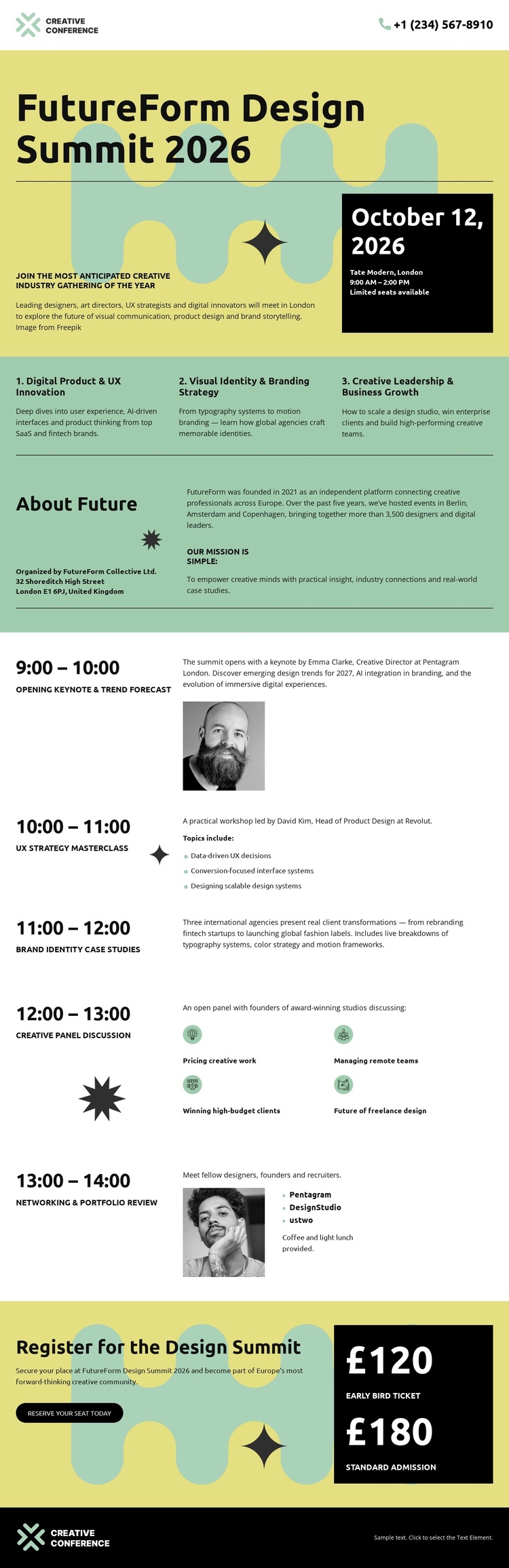
The three adjacent topic columns divide the conference message into structured informational regions. Digital Product & Innovation, Visual Identity & Branding, and Creative Leadership & Business Growth can be understood as separate content areas within the same event presentation, while the shared layout keeps them visually coordinated. The About Summit block then provides a compact place for the broader event description before visitors reach the detailed program.
The chronological agenda offers a second, more granular content structure. Time labels organize the morning and afternoon sequence, while session entries identify the opening keynote, UX strategy masterclass, brand identity case studies, creative pixel discussion, and networking and portfolio review. Selected speaker portraits add visual context without changing the schedule’s primary order. This combination suits a CMS-managed event site where structured information may need to remain clear as descriptions or session details evolve.
The registration section supplies a distinct region for the call to action and the two displayed admission levels: £120 early bird and £180 standard admission. Navigation and the dark footer provide shared boundaries around the content. In a Joomla project, the template’s strength is this division between topic, overview, agenda, and registration regions, rather than any claim that Joomla Articles or modules already exist in the page.
Customize with Nicepage
Open this ready-made template in the Joomla Page Builder and customize it visually in the Nicepage editor. Replace demo content, edit page sections, and adapt the design to your project without rebuilding the template from scratch.
Work With This Template in Joomla
Customize and Install the Joomla Template
Start with this ready-made template instead of building the Joomla design from scratch. Customize its layout, content, typography, images, sections, and other design elements visually in the Nicepage application, then export and install the Joomla Template, Nicepage Extension, and supported content on your Joomla website.
Edit the Template Directly in Joomla
After installation, you can edit the Joomla Template directly in Joomla with the Nicepage Joomla Extension. Customize the Header, Footer, Colors, Fonts, typography, and Page Templates from the Joomla workflow while keeping the site design connected with your CMS content.
Edit Joomla Articles Visually
Use the Nicepage Joomla Extension to open and edit Joomla Articles visually from the Joomla Administrator. Change text, images, sections, layouts, and other page content in the Nicepage editor while continuing to manage the Articles through Joomla.
Joomla Content and Template Integration
Use the customized template together with Joomla Articles, module Positions, menus, forms, Blog Pages, and other supported CMS elements. With the Nicepage Extension used as the Site Style Source, shared design settings can be applied across Joomla Articles while Joomla continues to provide the CMS environment for managing site content.
This workflow combines a ready-made Joomla Template with visual customization, direct template editing in Joomla, and continued content management through the Nicepage Joomla Extension.