Branding and web design Joomla Template


Structured Service Categories for Joomla-Managed Content
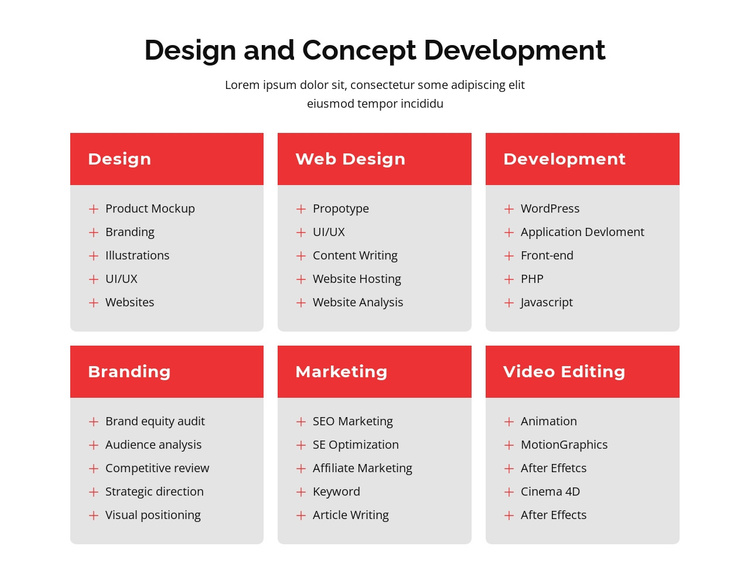
The six cards divide the block into stable informational categories that can sit within a Joomla-managed page. Design, Web Design, Development, Branding, Marketing, and Video Editing each receive their own visual region, and the five listed capabilities inside every card give the section more depth than a simple category row. For example, the Branding group outlines brand equity audit, audience analysis, competitive review, strategic direction, and visual positioning, while the Development group focuses on WordPress, application development, front-end, PHP, and Javascript.
The card system also gives the content a repeatable presentation. Three columns across two rows make the six groups easy to compare, while colored heading bands identify categories before the light-gray bodies present their associated capabilities. Rounded corners and red plus-style markers provide visual continuity without changing the informational role of the lists. The centered introduction establishes the subject of the section, and the card grid carries the detailed service taxonomy beneath it.
In a Joomla-oriented project, this block can serve as a reusable content region for structured service information while the surrounding site handles broader editorial organization and page relationships. Its static presentation is useful when the categories and capabilities should remain visible together, rather than depending on CMS-specific modules or interactions inside the section.
Customize with Nicepage
Open this ready-made template in the Joomla Page Builder and customize it visually in the Nicepage editor. Replace demo content, edit page sections, and adapt the design to your project without rebuilding the template from scratch.
Edit Template Offline
2. Create a new page or select existing
3. Click Add new block, search for id 529533 and click enter
Edit Template Online
Create Awesome Websites


Free Nicepage Builder
Keywords
Work With This Template in Joomla
Customize and Install the Joomla Template
Start with this ready-made template instead of building the Joomla design from scratch. Customize its layout, content, typography, images, sections, and other design elements visually in the Nicepage application, then export and install the Joomla Template, Nicepage Extension, and supported content on your Joomla website.
Edit the Template Directly in Joomla
After installation, you can edit the Joomla Template directly in Joomla with the Nicepage Joomla Extension. Customize the Header, Footer, Colors, Fonts, typography, and Page Templates from the Joomla workflow while keeping the site design connected with your CMS content.
Edit Joomla Articles Visually
Use the Nicepage Joomla Extension to open and edit Joomla Articles visually from the Joomla Administrator. Change text, images, sections, layouts, and other page content in the Nicepage editor while continuing to manage the Articles through Joomla.
Joomla Content and Template Integration
Use the customized template together with Joomla Articles, module Positions, menus, forms, Blog Pages, and other supported CMS elements. With the Nicepage Extension used as the Site Style Source, shared design settings can be applied across Joomla Articles while Joomla continues to provide the CMS environment for managing site content.
This workflow combines a ready-made Joomla Template with visual customization, direct template editing in Joomla, and continued content management through the Nicepage Joomla Extension.