Design of houses and apartments Joomla Template


Edit Template Offline
2. Create new page and search for id 21152
Edit Template Online
Create Awesome Websites


Free Nicepage Builder
Keywords
Event panels and interior-space groups divide the content clearly
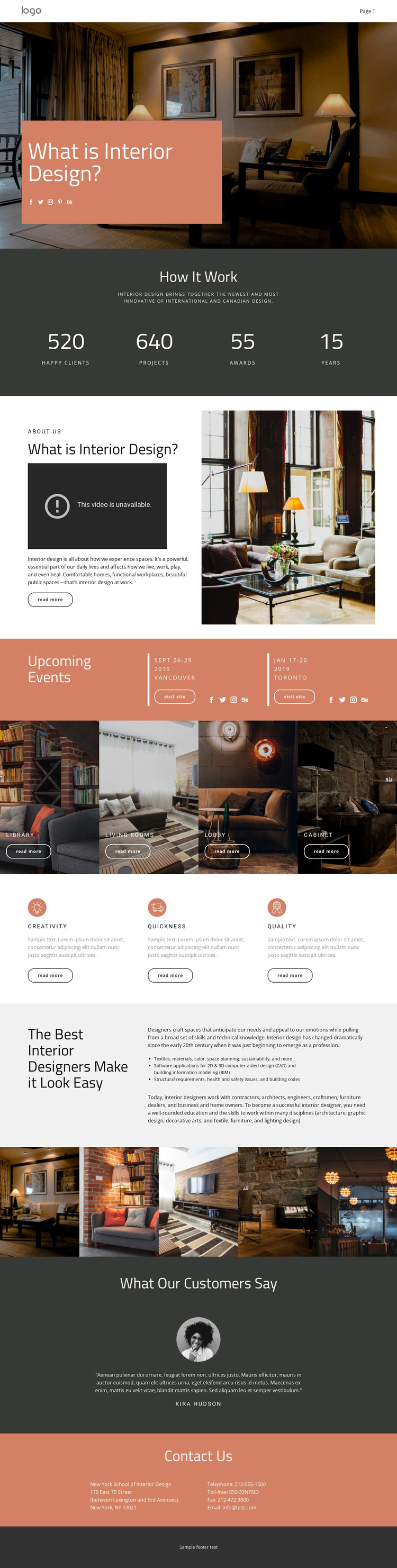
The two Upcoming Events panels give the design a useful structured-content starting point. Each panel presents event information and a Visit site action, creating a repeatable region that can be updated as event-related content changes. The four interior-space tiles provide a second grouped content type: Library, Living rooms, Lobby, and Cabinet are presented as labeled visual categories rather than as one undifferentiated image strip. Together, these areas suggest a page that can organize recurring information while preserving a consistent presentation.
The process overview, feature blocks, and educational section add different levels of editorial depth. Four metric displays summarize the process, three short feature units identify Creativity, Quickness, and Quality, and the longer split section explains the discipline, its skills, and its professional context. Navigation, social links, the testimonial area, contact details, and the dark footer provide shared regions around those content groups, helping the page read as a coordinated site area rather than a loose collection of blocks.
For Joomla adaptation, the design is therefore most useful where structured information, menus, galleries, and contact content need to remain visually connected. The template does not prove that Joomla Articles or module positions already exist. If a Joomla implementation needs those CMS-managed regions, Nicepage documentation covers the Joomla Template and Articles workflow without changing the verified facts of this particular design.
Customize with Nicepage
Open this ready-made template in the Joomla Page Builder and customize it visually in the Nicepage editor. Replace demo content, edit page sections, and adapt the design to your project without rebuilding the template from scratch.
Work With This Template in Joomla
Customize and Install the Joomla Template
Start with this ready-made template instead of building the Joomla design from scratch. Customize its layout, content, typography, images, sections, and other design elements visually in the Nicepage application, then export and install the Joomla Template, Nicepage Extension, and supported content on your Joomla website.
Edit the Template Directly in Joomla
After installation, you can edit the Joomla Template directly in Joomla with the Nicepage Joomla Extension. Customize the Header, Footer, Colors, Fonts, typography, and Page Templates from the Joomla workflow while keeping the site design connected with your CMS content.
Edit Joomla Articles Visually
Use the Nicepage Joomla Extension to open and edit Joomla Articles visually from the Joomla Administrator. Change text, images, sections, layouts, and other page content in the Nicepage editor while continuing to manage the Articles through Joomla.
Joomla Content and Template Integration
Use the customized template together with Joomla Articles, module Positions, menus, forms, Blog Pages, and other supported CMS elements. With the Nicepage Extension used as the Site Style Source, shared design settings can be applied across Joomla Articles while Joomla continues to provide the CMS environment for managing site content.
This workflow combines a ready-made Joomla Template with visual customization, direct template editing in Joomla, and continued content management through the Nicepage Joomla Extension.