For all of your pets HTML Template


Edit Template Offline
2. Create new page and search for id 6172913
Edit Template Online
Create Awesome Websites


Free Nicepage Builder
Keywords
Mission, Testimonials, and Pet Stories in One Finished HTML Page
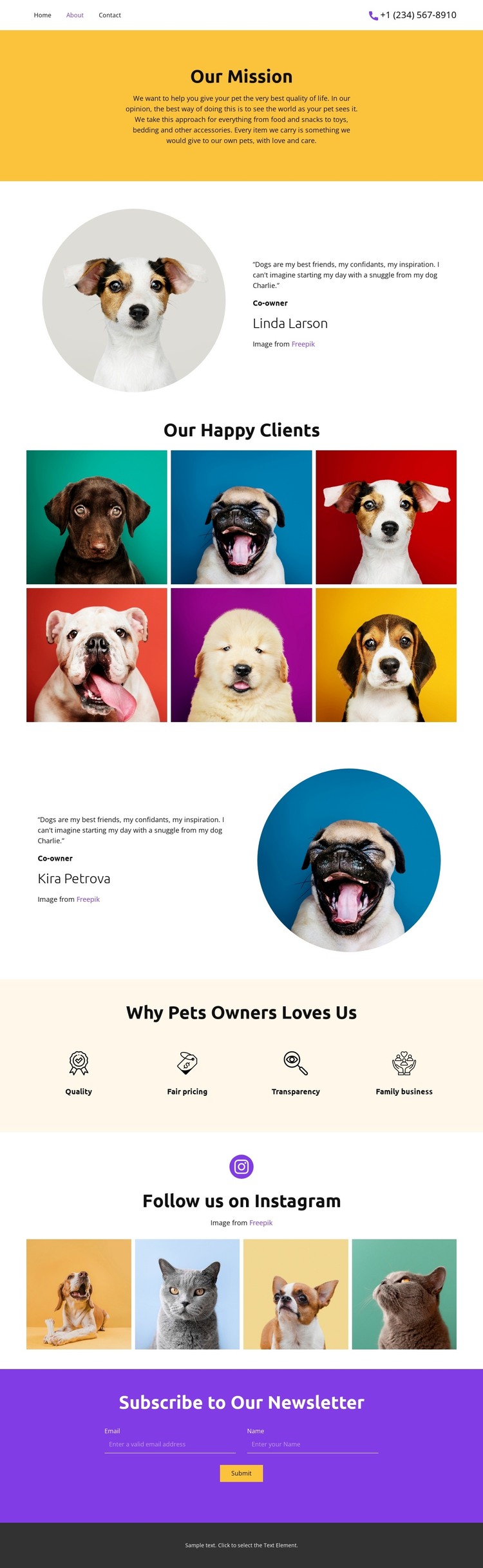
The mission statement gives this page a clear opening purpose: it explains the pet business’s focus on improving pets’ quality of life before visitors encounter supporting content. Two owner testimonial profiles then add human context without requiring a separate team or company-history page. Their circular portraits and adjacent text create recognizable content units that can stand on their own within a static HTML implementation.
The six-image pet gallery supplies a visual center for the page, while the four value highlights translate the business position into concise points: quality, fair pricing, transparency, and family business. Together, these sections create a finished information arrangement rather than a collection of unrelated decorative blocks. The later Instagram image strip continues the same image-led subject and gives the page another compact visual section.
Near the end, the newsletter area provides a specific interaction point. Its subscription form requests a name and email address, so the static page has a defined place for ongoing communication without changing the main about-page narrative. The warm yellow, cream, purple, teal, and dark gray palette, centered typography, and generous vertical spacing connect the mission, proof, imagery, and subscription sections into one coherent standalone HTML page.
Customize with Nicepage
Open this ready-made template in the HTML Builder and customize it visually in the Nicepage editor. Replace demo content, edit page sections, and adapt the design to your project without rebuilding the template from scratch.
Export and Use This Template as an HTML Website
Create a Portable HTML Website
When the template is ready, use the HTML Export option to create a static website with the files required for deployment. The exported website can be used independently of the Nicepage editor and deployed on your preferred hosting.
Nicepage also provides SEO settings and optimization features, including Page Titles and Descriptions, Canonical settings, headings, image Alt Text, and other page-level properties that help prepare the website for search engines.
Deploy Without a CMS
Upload the finished website to the hosting environment that fits your project. Because the exported site does not require WordPress, Joomla, or another CMS to deliver its pages, it can be placed on your own server, uploaded to a hosting provider, or deployed through an existing web infrastructure.
Hand Off the Website Files
The generated website files can also be provided to a client, developer, or hosting team. They remain available outside the Nicepage editor for deployment, technical review, or project-specific development when additional work is required.
This workflow makes the template a practical foundation for a portable static website that can be exported from the Nicepage editor and deployed independently.

Design Set (10)



More from Pets & Animals HTML Templates
-
Free Website Builder SoftwareDownload