Global modern architecture HTML Template


Edit Template Offline
2. Create new page and search for id 34994
Edit Template Online
Create Awesome Websites


Free Nicepage Builder
Keywords
Property Story, Images, and Booking Content Form a Finished Page
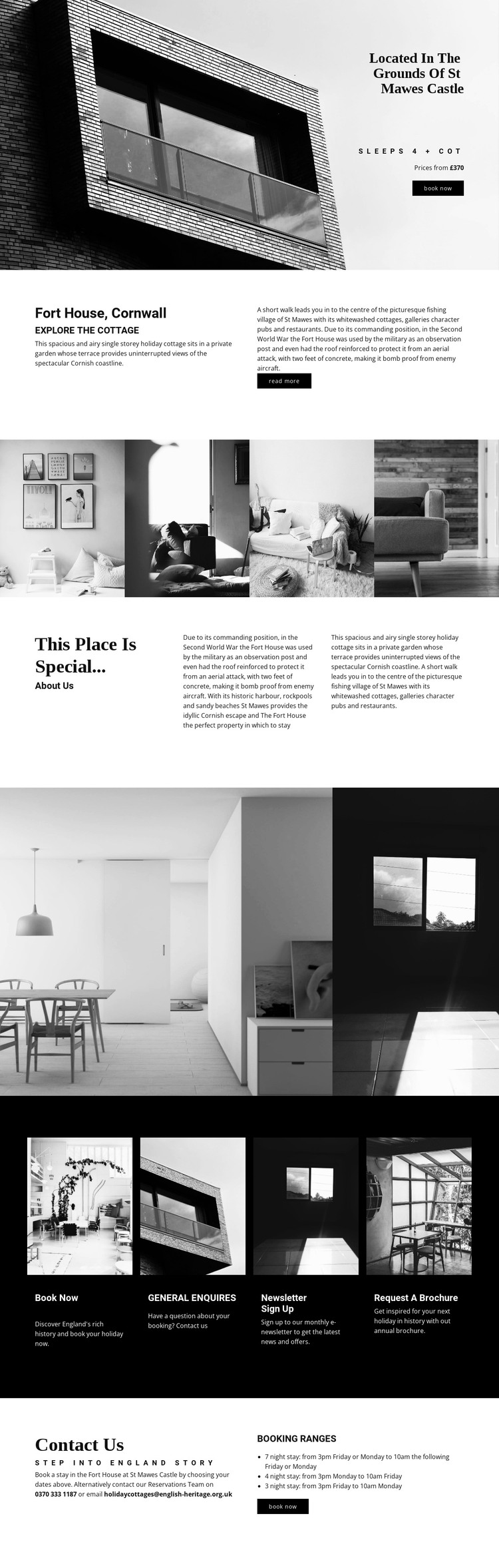
The design brings the main information a visitor needs into one coherent static presentation. A large opening image introduces Fort House through its position in the grounds of St Mawes Castle, while the adjacent title, occupancy detail, price reference, and Book now action establish the accommodation context immediately. The next split section expands that first impression with an overview of the cottage, its coastal setting, and supporting historical information.
The page does not rely on one photograph alone. A horizontal strip of four property images is followed later by a two-image interior group, allowing the visual story to move from general place and architecture toward the spaces inside the cottage. The “This place is special...” section adds descriptive context between these image-led areas, so the page balances visual proof with readable explanation. This makes the arrangement suitable as a finished static HTML implementation rather than only a decorative concept.
Near the end, four consistent cards organize Book now, General enquiries, Newsletter sign up, and Request a brochure. The closing area adds reservations details and guidance for seven-night, four-night, and three-night booking ranges. Those parts give the static page clear informational and response roles. Nicepage supports HTML Export for turning a completed project into a static website, but the template’s value here is the already connected content arrangement.
Customize with Nicepage
Open this ready-made template in the HTML Builder and customize it visually in the Nicepage editor. Replace demo content, edit page sections, and adapt the design to your project without rebuilding the template from scratch.
Export and Use This Template as an HTML Website
Create a Portable HTML Website
When the template is ready, use the HTML Export option to create a static website with the files required for deployment. The exported website can be used independently of the Nicepage editor and deployed on your preferred hosting.
Nicepage also provides SEO settings and optimization features, including Page Titles and Descriptions, Canonical settings, headings, image Alt Text, and other page-level properties that help prepare the website for search engines.
Deploy Without a CMS
Upload the finished website to the hosting environment that fits your project. Because the exported site does not require WordPress, Joomla, or another CMS to deliver its pages, it can be placed on your own server, uploaded to a hosting provider, or deployed through an existing web infrastructure.
Hand Off the Website Files
The generated website files can also be provided to a client, developer, or hosting team. They remain available outside the Nicepage editor for deployment, technical review, or project-specific development when additional work is required.
This workflow makes the template a practical foundation for a portable static website that can be exported from the Nicepage editor and deployed independently.

More from Architecture & Building HTML Templates
-
Free Website Builder SoftwareDownload