Every travel is unique Html Code Example


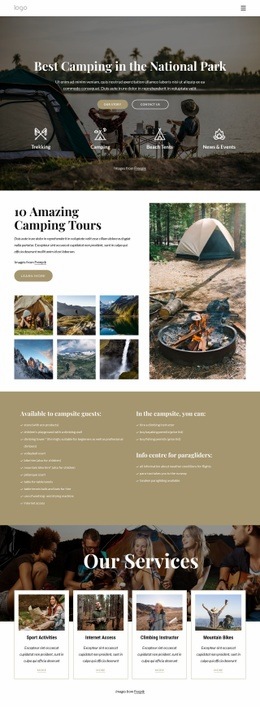
Four service cards create clear extension areas
The four service cards divide the section into distinct content regions for Sport Activities, Internet Access, Climbing Instructor, and Mountain Bikes. Each region already has the same internal pattern: a rectangular image introduces the subject, descriptive text supplies context, and a More link provides a visible destination for further information. That repeated arrangement creates logical places for project-specific additions without disturbing the main travel-services message.
The centered heading and supporting paragraph establish the subject before visitors reach the card row. Behind them, the full-width scenic background image gives the section a strong visual setting, while the white rounded cards create contrast and keep the text legible. If a project later needs custom HTML, an external widget, or another data-driven element, the bounded card regions and their links offer natural points for an extension related to a particular activity. Such an addition can sit alongside the existing content rather than replacing the four-card structure. The static interaction also keeps the behavior predictable: custom functionality would be an intentional enhancement around clearly defined service information, not a correction to an existing interactive component.
Customize with Nicepage
Open this ready-made template in the HTML Code Generator and customize it visually in the Nicepage editor. Replace demo content, edit page sections, and adapt the design to your project without rebuilding the template from scratch.
Edit Template Offline
2. Create a new page or select existing
3. Click Add new block, search for id 3485380 and click enter
Edit Template Online
Create Awesome Websites


Free Nicepage Builder
Keywords
Extend This Page With Custom HTML Code
Insert Code With the HTML Element
Use the HTML Element to add custom code directly to a Block in the Nicepage editor. Enter the required markup in the Code field when the page needs content or functionality that is not available through the standard page elements.
Place the HTML Element in the Layout
Treat the HTML Element as part of the visual page composition. Adjust its position, width, height, alignment, and margins to place the custom content where it belongs alongside text, images, buttons, and other elements. This makes it possible to combine visually edited sections with project-specific code without separating the custom element from the rest of the layout.
Add HTML, CSS, JavaScript, and External Components
The HTML Element supports HTML, CSS, and JavaScript, allowing you to extend the page with custom markup and interactive functionality. It can also be used to embed custom code and third-party components, such as social feeds, advertising code, widgets, or other external functionality required by the project.
This workflow makes the template useful for projects that need a visual page editor together with custom HTML code, JavaScript, embedded components, and functionality beyond the standard page elements.