
Community Police Services WordPress Theme


Edit Template Offline
2. Create new page and search for id 6565804
Edit Template Online
Create Awesome Websites


Free Nicepage Builder
Keywords
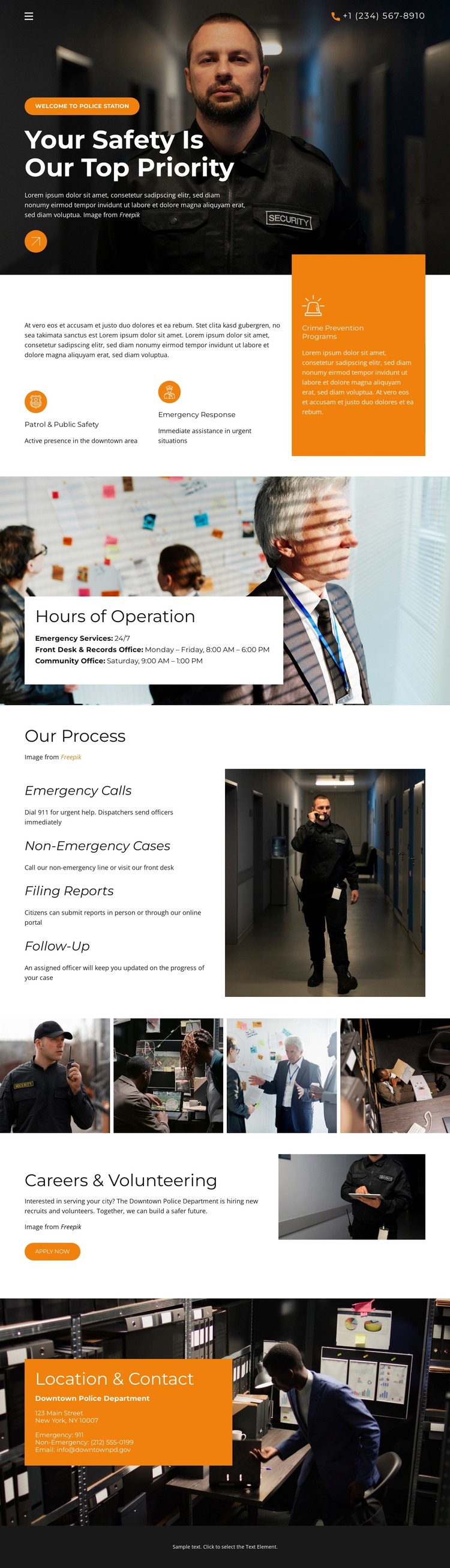
Service Areas and Editorial Content Divide the Safety Page Clearly
The design separates several kinds of content that can be maintained as distinct page areas in a WordPress-managed project. The opening hero carries the primary safety message and phone contact line, while the Crime Prevention section introduces the organization through an orange information panel and two labeled service highlights. These areas provide permanent page content rather than depending on sample names, addresses, or statistics.
The Hours of Operation block gives practical information its own visual container: a white card sits over a large photograph and groups emergency availability, community service hours, and office hours. The Our Process section offers another content-oriented division, presenting Emergency Calls, Non-Emergency Cases, Filing Reports, and Follow-Up as four separate labels with supporting descriptions. This structure can help keep operational explanations distinct from general service messaging as the project content develops.
Careers & Volunteering creates a separate recruitment-oriented area with its own action element, while Location & Contact gathers the organization label and displayed contact details into an orange panel over an operational image. The shared navy, white, and orange treatment links these areas visually, so page content can expand or be updated without losing the design’s identity. The displayed phone number and address should be treated as template content and verified before use.
Customize with Nicepage
Open this ready-made template in the WordPress Website Builder and customize it visually in the Nicepage editor. Replace demo content, edit page sections, and adapt the design to your project without rebuilding the template from scratch.
Manage and Edit This Theme in WordPress
Customize and Install the WordPress Theme
Start with this ready-made theme instead of building the WordPress design from scratch. Customize its layout, content, typography, images, sections, and other design elements visually in Nicepage editor, then export and install the WordPress Theme, Plugin, and Pages on your WordPress site. The Nicepage WordPress Plugin lets you continue working with the site after installation.
Edit the Theme Directly in WordPress
After installation, you can edit the WordPress Theme directly in WordPress with the Nicepage WordPress Plugin. Use Site Style to customize site Colors, Fonts, Header, Footer, Blog, and Post Page Templates while working within your WordPress website.
Edit WordPress Pages Visually
Use the Nicepage WordPress Plugin to edit page content directly from the WordPress admin area. Open a WordPress Page with Nicepage and visually change its text, images, sections, and other page elements while continuing to manage the Page through WordPress.
WordPress Content and Theme Integration
Use the customized theme with WordPress Pages, Posts, Blog and Post Templates, menus, widgets, and other CMS-managed content. Shared theme elements such as Colors, Fonts, Header, Footer, Blog, and Post Page Templates can be managed as part of the overall site design, while WordPress provides the CMS environment for managing site content.
This workflow combines a ready-made WordPress Theme with visual customization, direct theme editing in WordPress, and continued content management through the Nicepage WordPress Plugin.
