Hight quality services WordPress Theme


Numbered Feature Cards as Stable WordPress Page Content
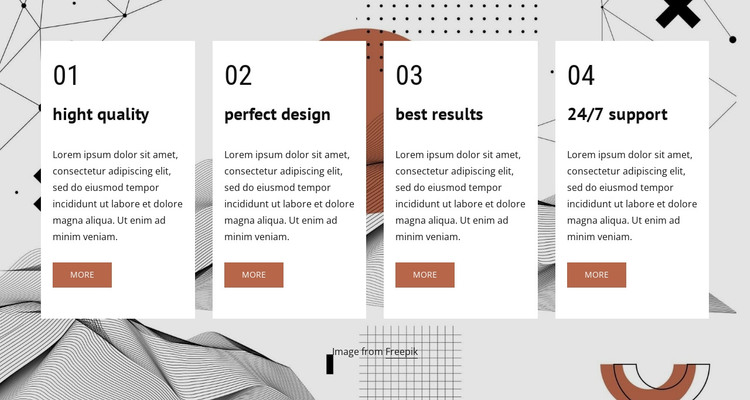
The four repeated cards provide a compact page-content pattern for presenting related feature highlights in a WordPress-managed project. Their shared structure makes the group easy to scan: each item begins with a sequence number, continues with a heading and description, and ends with a “more” button. The labels “hight quality,” “perfect design,” “best results,” and “24/7 support” distinguish the four units, while the placeholder descriptions indicate where final site-specific wording can be inserted.
The visual arrangement reinforces the content model. Four equal-width white cards form a horizontal row over an abstract full-width image, creating a clear foreground layer against geometric monochrome linework. Bold headings provide hierarchy inside each card, compact spacing keeps the group dense, and muted rust buttons repeat the same action treatment across the row. Since the interaction is static, the section presents all four feature units at once instead of hiding them behind tabs or slides.
Within a WordPress-oriented website, this block can serve as stable content on a services, capabilities, or supporting information page while other CMS-managed areas develop around it. The repeated cards can remain a consistent visual section even when their text is updated. The individual “more” actions may lead to fuller explanations elsewhere, but the block itself remains a focused feature group rather than a standalone theme or complete page.
Customize with Nicepage
Open this ready-made template in the WordPress Website Builder and customize it visually in the Nicepage editor. Replace demo content, edit page sections, and adapt the design to your project without rebuilding the template from scratch.
Edit Template Offline
2. Create a new page or select existing
3. Click Add new block, search for id 496662 and click enter
Edit Template Online
Create Awesome Websites


Free Nicepage Builder
Keywords
Manage and Edit This Theme in WordPress
Customize and Install the WordPress Theme
Start with this ready-made theme instead of building the WordPress design from scratch. Customize its layout, content, typography, images, sections, and other design elements visually in Nicepage editor, then export and install the WordPress Theme, Plugin, and Pages on your WordPress site. The Nicepage WordPress Plugin lets you continue working with the site after installation.
Edit the Theme Directly in WordPress
After installation, you can edit the WordPress Theme directly in WordPress with the Nicepage WordPress Plugin. Use Site Style to customize site Colors, Fonts, Header, Footer, Blog, and Post Page Templates while working within your WordPress website.
Edit WordPress Pages Visually
Use the Nicepage WordPress Plugin to edit page content directly from the WordPress admin area. Open a WordPress Page with Nicepage and visually change its text, images, sections, and other page elements while continuing to manage the Page through WordPress.
WordPress Content and Theme Integration
Use the customized theme with WordPress Pages, Posts, Blog and Post Templates, menus, widgets, and other CMS-managed content. Shared theme elements such as Colors, Fonts, Header, Footer, Blog, and Post Page Templates can be managed as part of the overall site design, while WordPress provides the CMS environment for managing site content.
This workflow combines a ready-made WordPress Theme with visual customization, direct theme editing in WordPress, and continued content management through the Nicepage WordPress Plugin.