
Something big is coming soon WordPress Theme


The Announcement Reads as Structured Page Content
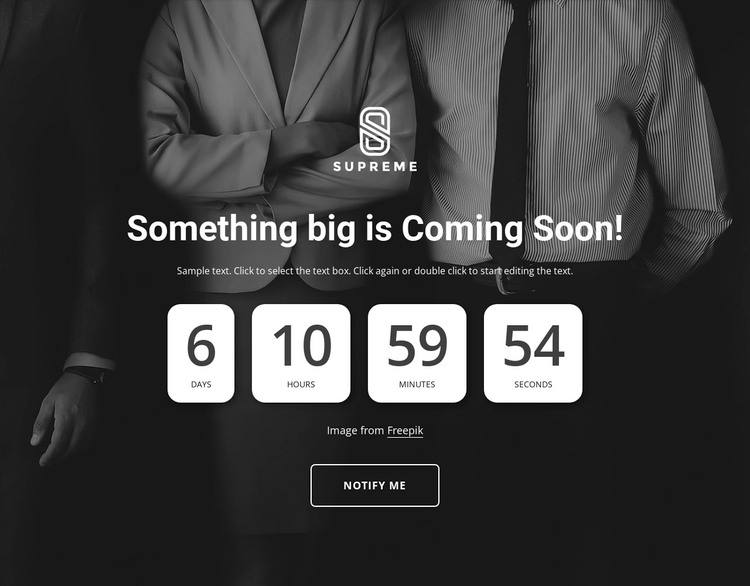
The centered heading and supporting paragraph establish the block as a focused announcement area, while the four-unit countdown adds a time-based content layer. Days, hours, minutes, and seconds appear in separate rounded white cards, making the repeated information easy to distinguish. The dark photographic background provides the visual field, and the white overlay keeps the launch message and timer legible. Below the attribution line, the outlined “Notify me” action gives the section a clear response cue without changing its core content role.
In a WordPress-oriented project, this block can serve as a stable visual region on a page while the wider site manages its other content around it. It could introduce an upcoming release, event, or collection, provided the final copy and imagery match the project. The section does not need to be treated as a complete theme: its value lies in preserving a recognizable arrangement for one announcement, with the surrounding site supplying any additional page functions.
The displayed countdown values are demo-derived and time-sensitive, so they should be updated for the intended schedule. The “Notify me” label can also be connected to the project’s chosen response arrangement when appropriate. The visual section remains useful because its hierarchy is already clear: announcement first, timing second, attribution and response afterward.
Customize with Nicepage
Open this ready-made template in the WordPress Website Builder and customize it visually in the Nicepage editor. Replace demo content, edit page sections, and adapt the design to your project without rebuilding the template from scratch.
Edit Template Offline
2. Create a new page or select existing
3. Click Add new block, search for id 1154610 and click enter
Edit Template Online
Create Awesome Websites


Free Nicepage Builder
Keywords
Manage and Edit This Theme in WordPress
Customize and Install the WordPress Theme
Start with this ready-made theme instead of building the WordPress design from scratch. Customize its layout, content, typography, images, sections, and other design elements visually in Nicepage editor, then export and install the WordPress Theme, Plugin, and Pages on your WordPress site. The Nicepage WordPress Plugin lets you continue working with the site after installation.
Edit the Theme Directly in WordPress
After installation, you can edit the WordPress Theme directly in WordPress with the Nicepage WordPress Plugin. Use Site Style to customize site Colors, Fonts, Header, Footer, Blog, and Post Page Templates while working within your WordPress website.
Edit WordPress Pages Visually
Use the Nicepage WordPress Plugin to edit page content directly from the WordPress admin area. Open a WordPress Page with Nicepage and visually change its text, images, sections, and other page elements while continuing to manage the Page through WordPress.
WordPress Content and Theme Integration
Use the customized theme with WordPress Pages, Posts, Blog and Post Templates, menus, widgets, and other CMS-managed content. Shared theme elements such as Colors, Fonts, Header, Footer, Blog, and Post Page Templates can be managed as part of the overall site design, while WordPress provides the CMS environment for managing site content.
This workflow combines a ready-made WordPress Theme with visual customization, direct theme editing in WordPress, and continued content management through the Nicepage WordPress Plugin.
