Digital Advertising Agency Template


Edit Template Offline
2. Create new page and search for id 6641717
Edit Template Online
Create Awesome Websites


Free Nicepage Builder
Keywords
Four Services and Three Market Contexts Shape the Design Choice
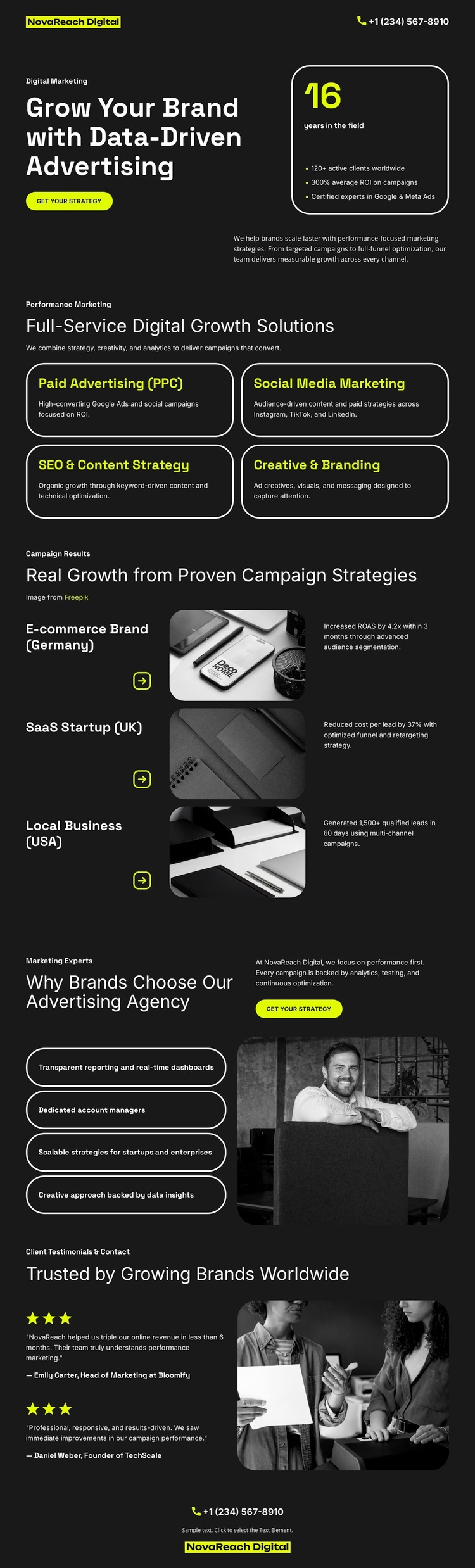
The strongest selection signal is the way this design combines a clear agency offer with several recognizable growth contexts. Four compact cards cover Paid Advertising, Social Media Marketing, SEO and Content Strategy, and Creative and Branding, giving the page enough service coverage for an agency whose work spans acquisition, communication, search, and creative direction. The grouping feels more specific than a generic business homepage built around one product or one service.
The three case-study rows add another useful distinction. An e-commerce brand in Germany, a SaaS startup in the UK, and a local business in the USA appear as separate labels beside imagery and short results copy. These examples should be treated as structural content when adapting the design, but they show how the layout can speak to different business models without losing its central advertising theme. The dark charcoal palette, lime accents, rounded cards, and white type reinforce that focused campaign character.
A portrait-led differentiator section and two testimonial blocks extend the page beyond a simple service list. Four reasons to choose the agency create an explanatory middle, while ratings and phone contact provide later reassurance and response context. This makes the template a strong option for projects that need to present a complete digital growth narrative—offer, application, agency distinction, proof, and contact—through a compact visual direction rather than through long corporate copy.
Customize with Nicepage
Open this ready-made template in the Template Builder and customize it visually in the Nicepage editor. Replace demo content, edit page sections, and adapt the design to your project without rebuilding the template from scratch.
Start With a Ready-Made Template
Choose a Design for a New Page
Use a ready-made template as a starting point instead of creating every page from a blank canvas. When adding a new page in Nicepage, browse available designs, compare different layouts, and choose an option that already fits the general purpose and visual direction of your project.
Browse Different Page Designs
Explore Page Designs using search, thematic categories, Design Sets, and full-page previews. The collection includes layouts for different subjects and page purposes, making it easier to compare alternatives before selecting a design to customize.
Customize the Selected Template
After choosing a design, create the page and continue editing it visually in Nicepage. Replace the demo content, adjust images, typography, colors, sections, and other elements, and adapt the ready-made layout to your own content instead of rebuilding the design from the beginning.
Explore More Design Directions
If the first option does not match your project closely enough, return to the design collection and compare other templates before committing to a layout. This makes the template library useful not only for faster page creation, but also for exploring different visual approaches and finding a suitable starting point for a new project.
This workflow gives you access to a broad collection of ready-made designs that can be selected, compared, and customized according to the needs of each new page or project.