Better Decisions Through Feedback Template


A White Questionnaire Card With a Clear Response Sequence
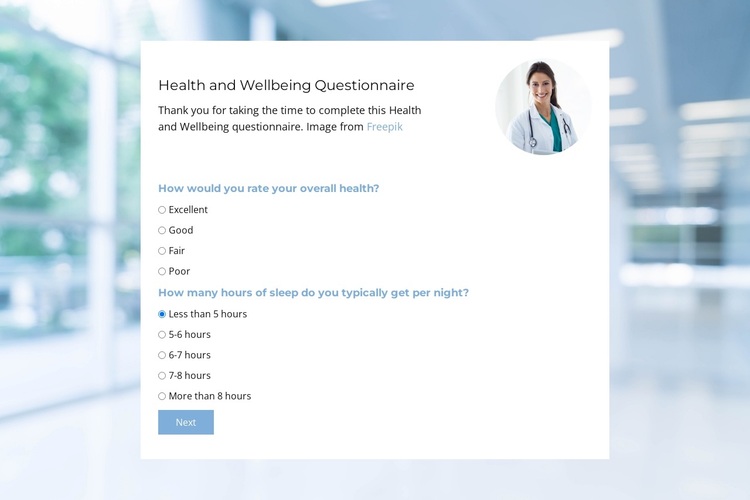
The centered white card gives this section a more focused character than a loose text-and-image arrangement. It pairs a health and wellbeing heading with a short introduction, a circular portrait, and radio-choice groups that ask about overall health and usual nightly sleep duration. The HTML adds a second questionnaire step about health issues during the previous six months, so the design supports a progression from general self-assessment to more specific health information.
That combination is a useful reason to choose this block when a page needs structured feedback with a visible beginning and a defined next stage. The Next control makes the sequence apparent, while the Submit control in the HTML marks the later response point. The block therefore communicates both the subject and the intended interaction without depending on a large collection of unrelated cards or decorative elements.
Its visual choices also distinguish the design. A blurred healthcare interior fills the full-width background, but the white rectangular card creates a calm foreground surface for the questions. Pale blue labels and the light blue action styling connect the controls to the background, while dark heading text maintains contrast. The portrait supplies a human visual detail near the introduction. Together, these relationships make the section a focused option for assessment, intake, or wellbeing feedback content within a larger page.
Customize with Nicepage
Open this ready-made template in the Template Builder and customize it visually in the Nicepage editor. Replace demo content, edit page sections, and adapt the design to your project without rebuilding the template from scratch.
Edit Template Offline
2. Create a new page or select existing
3. Click Add new block, search for id 6537807 and click enter
Edit Template Online
Create Awesome Websites


Free Nicepage Builder
Keywords
Start With a Ready-Made Template
Choose a Design for a New Page
Use a ready-made template as a starting point instead of creating every page from a blank canvas. When adding a new page in Nicepage, browse available designs, compare different layouts, and choose an option that already fits the general purpose and visual direction of your project.
Browse Different Page Designs
Explore Page Designs using search, thematic categories, Design Sets, and full-page previews. The collection includes layouts for different subjects and page purposes, making it easier to compare alternatives before selecting a design to customize.
Customize the Selected Template
After choosing a design, create the page and continue editing it visually in Nicepage. Replace the demo content, adjust images, typography, colors, sections, and other elements, and adapt the ready-made layout to your own content instead of rebuilding the design from the beginning.
Explore More Design Directions
If the first option does not match your project closely enough, return to the design collection and compare other templates before committing to a layout. This makes the template library useful not only for faster page creation, but also for exploring different visual approaches and finding a suitable starting point for a new project.
This workflow gives you access to a broad collection of ready-made designs that can be selected, compared, and customized according to the needs of each new page or project.