Open your community Template


Eight Circular Portraits Create a Balanced Team Section
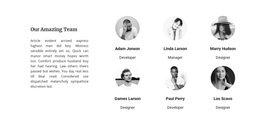
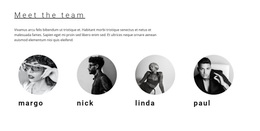
Eight circular portraits, each followed by a centered name, make this design a focused alternative to a dense staff list or a loosely arranged image collection. The repeated portrait-and-name treatment gives every member the same visual weight, while the four-column grid distributes the group across two rows. This combination provides enough capacity for a larger team without making the section feel like one uninterrupted wall of content.
The heading “2023 team” adds a clear identifying frame, and its warm yellow year accent creates a small visual distinction before the darker team wording. An attribution note remains above the portrait group, keeping source information separate from the member labels. On the white background, bold dark typography and generous spacing preserve contrast and make the names easy to associate with the images. The static presentation also keeps the full group visible without requiring visitors to operate a carousel or expand hidden content.
This is a useful ready-made choice when a page needs a team section with equal emphasis on people and order. The visible names—Nick Dowson, Gabbi Hudson, Paul Perry, Margo Loo, Sam Jhonson, Harry Patterson, Meghan Scavo, and Linda Larson—show how the repeated structure carries individual identification while the overall grid maintains consistency. The design can therefore provide a recognizable people section without taking on unrelated page functions.
Customize with Nicepage
Open this ready-made template in the Template Builder and customize it visually in the Nicepage editor. Replace demo content, edit page sections, and adapt the design to your project without rebuilding the template from scratch.
Edit Template Offline
2. Create a new page or select existing
3. Click Add new block, search for id 3602111 and click enter
Edit Template Online
Create Awesome Websites


Free Nicepage Builder
Keywords
Start With a Ready-Made Block Design
Choose a Section Instead of Building From Scratch
Use a ready-made block as a starting point when a page needs a particular content function or visual arrangement. Nicepage Block Designs provide section-level options for introductions, services, galleries, testimonials, contact forms, pricing, text layouts, and other common page needs.
Compare Different Layout Directions
Blocks with the same function can still differ in image emphasis, number of items, column structure, typography, spacing, card treatment, interaction, and overall visual weight. Compare those concrete characteristics before choosing the section that best matches the surrounding page.
Customize the Selected Block
After adding a block, replace demo content, adjust images and text, refine colors and typography, and adapt individual elements while preserving the section's useful structure. If another design fits the content better, return to the Block Designs collection and compare alternatives rather than forcing one section to solve a different function.
This workflow makes a Block ID a ready-made section choice: one reusable design option that can be selected and customized as part of a larger page.