Organic Mushroom Wellness Website Template


Edit Template Offline
2. Create new page and search for id 6662813
Edit Template Online
Create Awesome Websites


Free Nicepage Builder
Keywords
Products, Quality Standards, and Contact Form a Broader Site Foundation
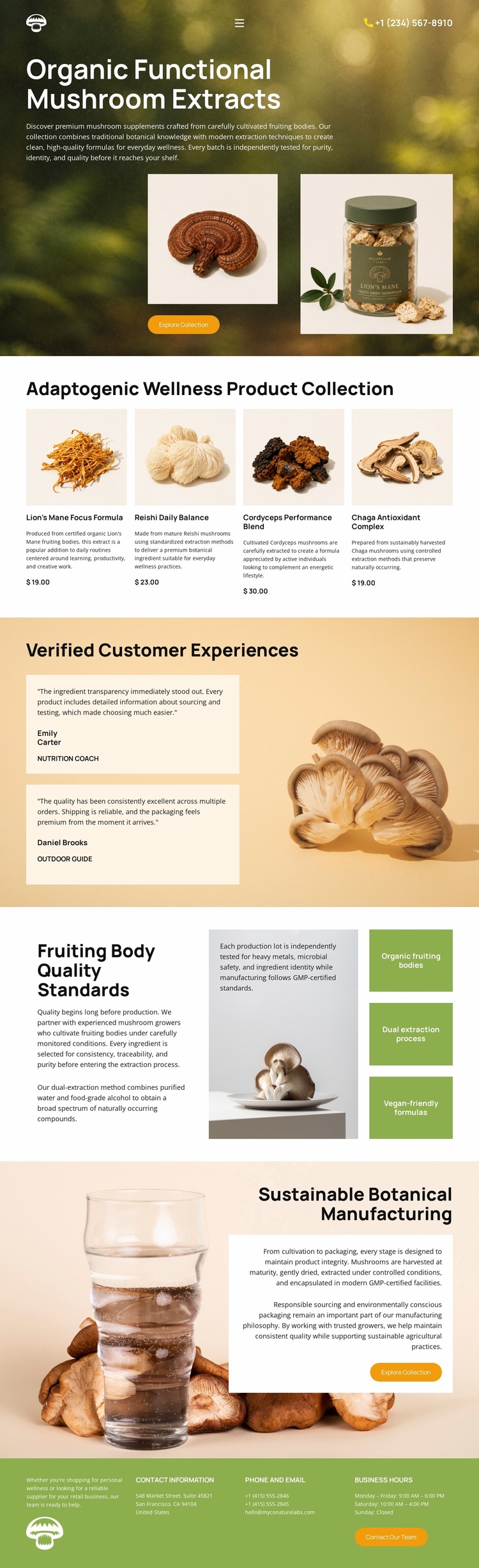
The design already identifies several major content areas that a larger wellness website could build around. The forest hero establishes the botanical product direction, while the four-card collection defines a practical product category with lion’s mane, reishi, cordyceps, and chaga offerings. Each card includes an image, description, price, and Add to Cart action, giving the project a repeatable product presentation rather than only a single promotional statement.
The two testimonial panels create a separate customer-experience area, and the quality section adds a second information category through organic fruiting bodies, dual extraction process, and vegan-friendly formulas. The manufacturing section expands the project’s informational range further by discussing cultivation, extraction, packaging, and manufacturing practices beside a large botanical image. These areas could inform future pages about products, standards, company practices, or customer experience, although the analysis confirms this particular design as one page rather than a prebuilt multi-page set.
The footer contributes reusable site-level content through contact information, phone and email details, business hours, and a Contact Our Team action. That combination gives a broader project clear categories for product presentation, proof, production explanation, and communication. Nicepage’s Pages panel can help manage additional pages if the project grows, but the template-specific foundation is the information architecture already visible here and the way its repeated visual direction connects those categories.
Customize with Nicepage
Open this ready-made template in the Website Template Builder and customize it visually in the Nicepage editor. Replace demo content, edit page sections, and adapt the design to your project without rebuilding the template from scratch.
Build a Complete Website From This Template
Customize the Website Visually
Use this ready-made website template as a starting point for your project and adapt its pages visually in Nicepage. Change content, images, typography, navigation, sections, and other design elements while keeping the website together as a single editable project.
Manage Website Pages in One Project
Use the Pages panel to open, add, duplicate, and manage the pages of your website. Work on individual pages while keeping navigation and the overall site structure accessible from the same project, making it easier to develop a complete website instead of managing separate page files.
Expand the Website With Matching Designs
When you need additional pages or sections, use Page Design Sets to find Page and Block Designs created in the same visual style. Design Sets group matching designs together, making it easier to expand the website with new content while maintaining a consistent look across its pages and sections.
Organize Larger Multi-Page Websites
As the website grows, use Page Folders to organize related pages and keep larger multi-page projects easier to navigate in the editor. This is especially useful for websites with separate service pages, company information, contacts, landing pages, and other content areas.
This workflow makes the template a practical foundation for building and expanding a complete website while managing its pages, content, and visual design within one Nicepage project.