Point Of Sale Website Template


Edit Template Offline
2. Create new page and search for id 6652165
Edit Template Online
Create Awesome Websites


Free Nicepage Builder
Keywords
POS Product Areas Provide a Clear Foundation for Site Expansion
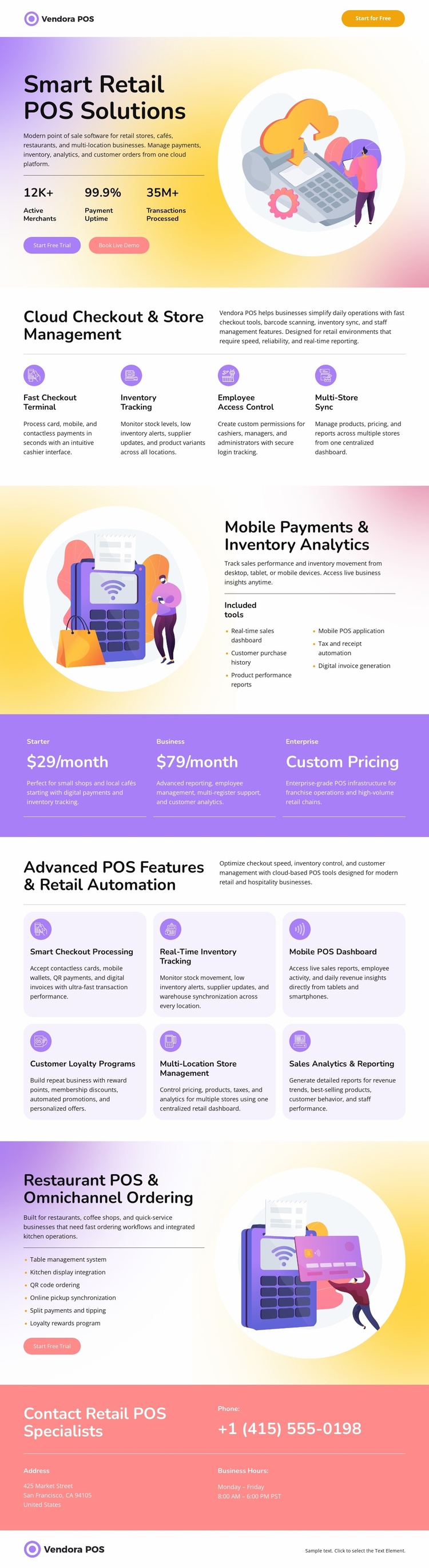
The design already identifies the major subject areas a retail software website would need to communicate. The hero establishes Vendora POS and its primary checkout proposition, while the cloud-management section defines operational content around terminals, inventory, employee access, and multiple stores. The mobile payments and inventory analytics block adds a separate technology-focused area, and the three pricing cards create a commercial section that can remain distinct from explanatory content.
The six advanced feature cards provide another reusable content pattern for describing automation, loyalty, multi-location management, and reporting. The restaurant block broadens the project’s audience by organizing table management, kitchen display integration, QR ordering, online ordering synchronization, and split payments around a recognizable use case. These areas could guide future service, industry, or product pages, but the analysis confirms one page rather than a prebuilt multi-page set.
A coral contact band gives the project a defined sales-contact region with phone, address, and business-hours content, while the footer preserves the Vendora POS identity. The value of this website template is therefore its starting information architecture: product promise, operational capabilities, plans, specialized use case, and contact response are already arranged in a coordinated visual system. Additional pages could follow these established relationships without requiring the project to invent its core content categories from the beginning.
Customize with Nicepage
Open this ready-made template in the Website Template Builder and customize it visually in the Nicepage editor. Replace demo content, edit page sections, and adapt the design to your project without rebuilding the template from scratch.
Build a Complete Website From This Template
Customize the Website Visually
Use this ready-made website template as a starting point for your project and adapt its pages visually in Nicepage. Change content, images, typography, navigation, sections, and other design elements while keeping the website together as a single editable project.
Manage Website Pages in One Project
Use the Pages panel to open, add, duplicate, and manage the pages of your website. Work on individual pages while keeping navigation and the overall site structure accessible from the same project, making it easier to develop a complete website instead of managing separate page files.
Expand the Website With Matching Designs
When you need additional pages or sections, use Page Design Sets to find Page and Block Designs created in the same visual style. Design Sets group matching designs together, making it easier to expand the website with new content while maintaining a consistent look across its pages and sections.
Organize Larger Multi-Page Websites
As the website grows, use Page Folders to organize related pages and keep larger multi-page projects easier to navigate in the editor. This is especially useful for websites with separate service pages, company information, contacts, landing pages, and other content areas.
This workflow makes the template a practical foundation for building and expanding a complete website while managing its pages, content, and visual design within one Nicepage project.