Develop your business Website Template


Edit Template Offline
2. Create new page and search for id 32351
Edit Template Online
Create Awesome Websites


Free Nicepage Builder
Keywords
Three capability areas anchor a broader agency website foundation
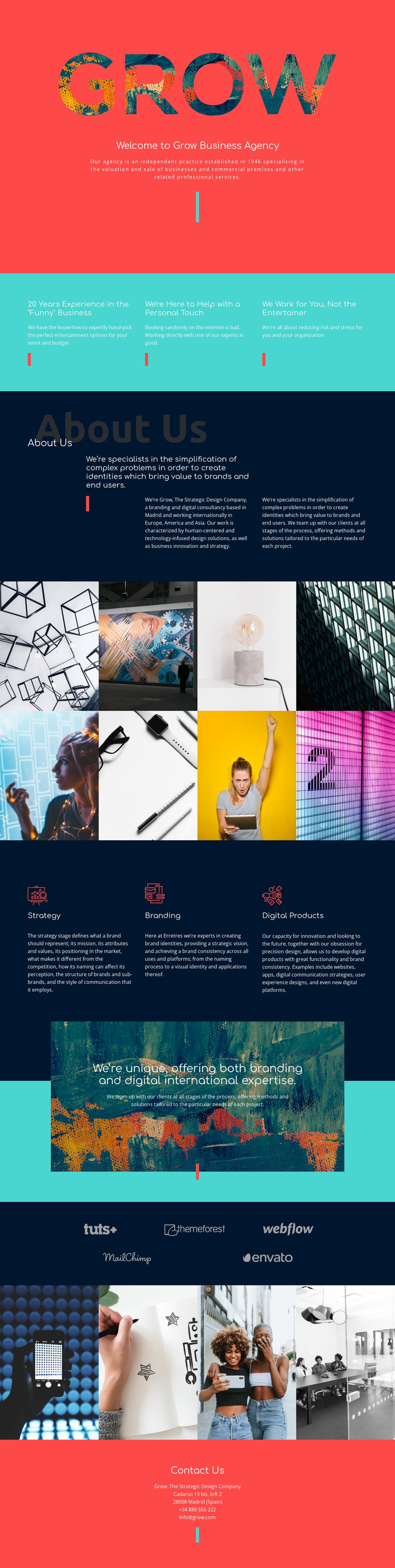
Strategy, Branding, and Digital Products give the design three clear capability areas around which a broader agency website can be organized. They follow an opening introduction and three value statements about experience, personal support, and client focus, so the page already establishes both what the agency does and how it presents its approach. That combination provides more than a decorative homepage: it identifies the main content categories a growing project would need to preserve.
The About Us section adds organizational context through three aligned text columns, including the agency’s Madrid base and its described work across Europe, America, and Asia. Two separate photographic image panels create additional visual content areas, while the five-logo display can support a distinct section for partner or client marks when those relationships are verified and ready to be presented. The textured image-backed statement reinforces the combined branding and digital positioning without introducing a competing visual direction.
The final contact section completes the foundation with an address, telephone number, and email. Additional pages could develop the three capability areas or explain the agency story in greater depth while retaining the coral, turquoise, navy, rounded typography, image treatment, and strong vertical separators established here. This makes the design a practical starting structure for a larger website project rather than only a single promotional screen.
Customize with Nicepage
Open this ready-made template in the Website Template Builder and customize it visually in the Nicepage editor. Replace demo content, edit page sections, and adapt the design to your project without rebuilding the template from scratch.
Build a Complete Website From This Template
Customize the Website Visually
Use this ready-made website template as a starting point for your project and adapt its pages visually in Nicepage. Change content, images, typography, navigation, sections, and other design elements while keeping the website together as a single editable project.
Manage Website Pages in One Project
Use the Pages panel to open, add, duplicate, and manage the pages of your website. Work on individual pages while keeping navigation and the overall site structure accessible from the same project, making it easier to develop a complete website instead of managing separate page files.
Expand the Website With Matching Designs
When you need additional pages or sections, use Page Design Sets to find Page and Block Designs created in the same visual style. Design Sets group matching designs together, making it easier to expand the website with new content while maintaining a consistent look across its pages and sections.
Organize Larger Multi-Page Websites
As the website grows, use Page Folders to organize related pages and keep larger multi-page projects easier to navigate in the editor. This is especially useful for websites with separate service pages, company information, contacts, landing pages, and other content areas.
This workflow makes the template a practical foundation for building and expanding a complete website while managing its pages, content, and visual design within one Nicepage project.