We contribute to art Website Template


Edit Template Offline
2. Create new page and search for id 25550
Edit Template Online
Create Awesome Websites


Free Nicepage Builder
Keywords
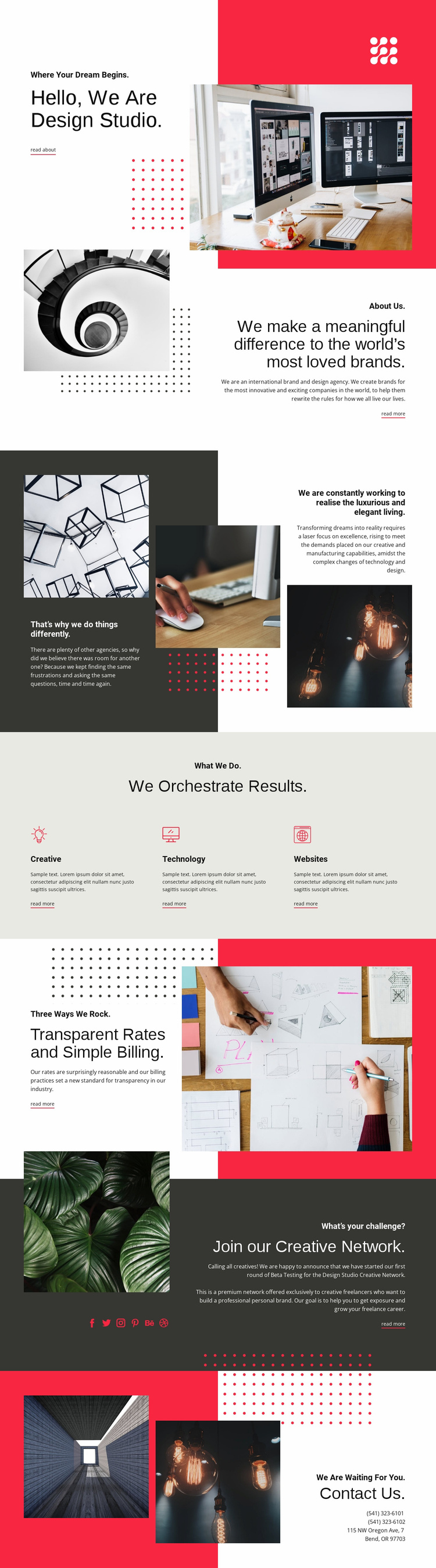
Three Service Areas Anchor a Broader Studio Website Foundation
The hero and About Us sections establish the studio’s identity before the page moves into a more explicit explanation of its approach. That progression gives a broader website project a useful starting structure: visitors first encounter the agency, then see its brand-design positioning and the reasoning behind its different way of working. The three-part philosophy section adds depth between the introduction and the service offer, preventing the site foundation from being reduced to a collection of promotional labels.
Creative, Technology, and Websites provide three distinct content areas around which additional agency information could be organized. They can support more detailed service explanations or related pages later, while the existing three-item arrangement already gives the main presentation a clear center. The transparent rates and simple billing section adds a commercial information area, and the creative-network invitation introduces a separate audience of freelancers rather than forcing every message into the client-services path.
The image-led hero, collage-based About Us section, asymmetrical philosophy layout, and later split panels supply a consistent visual framework for these content categories. Social links and the final contact area extend that framework toward ongoing connection, while the sample phone numbers and Bend, Oregon address should be replaced with project-specific details. As a website template, this design offers a coherent agency structure that can grow beyond its initial page without claiming that additional pages are already included.
Customize with Nicepage
Open this ready-made template in the Website Template Builder and customize it visually in the Nicepage editor. Replace demo content, edit page sections, and adapt the design to your project without rebuilding the template from scratch.
Build a Complete Website From This Template
Customize the Website Visually
Use this ready-made website template as a starting point for your project and adapt its pages visually in Nicepage. Change content, images, typography, navigation, sections, and other design elements while keeping the website together as a single editable project.
Manage Website Pages in One Project
Use the Pages panel to open, add, duplicate, and manage the pages of your website. Work on individual pages while keeping navigation and the overall site structure accessible from the same project, making it easier to develop a complete website instead of managing separate page files.
Expand the Website With Matching Designs
When you need additional pages or sections, use Page Design Sets to find Page and Block Designs created in the same visual style. Design Sets group matching designs together, making it easier to expand the website with new content while maintaining a consistent look across its pages and sections.
Organize Larger Multi-Page Websites
As the website grows, use Page Folders to organize related pages and keep larger multi-page projects easier to navigate in the editor. This is especially useful for websites with separate service pages, company information, contacts, landing pages, and other content areas.
This workflow makes the template a practical foundation for building and expanding a complete website while managing its pages, content, and visual design within one Nicepage project.