Legendary Sounds Website Template



Edit Template Offline
2. Create new page and search for id 24176
Edit Template Online
Create Awesome Websites


Free Nicepage Builder
Keywords
Performance History and Song Features Establish a Website Foundation
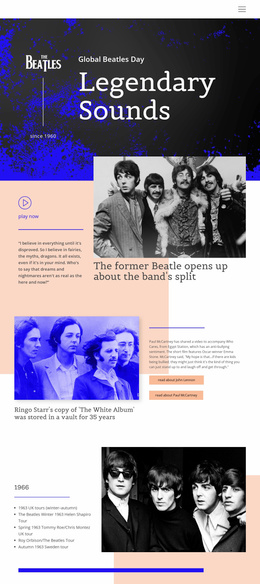
The navigation, hero, and editorial sections already define several major content areas for a Beatles-focused website project. The opening presents the subject through the Beatles logo, Global Beatles Day, the since-1960 marker, and a strong photographic title treatment. Beneath it, the featured split story and artist-story section create separate areas for band history and individual biographies, with links about John Lennon and Paul McCartney providing clear directions for related content.
The historical material is organized in more than one useful way. A 1966 tour section pairs chronology with an archival band photograph, while the larger performance grid groups live appearances into four year columns covering 1963, 1964, 1965, and 1966. This gives the project an expandable subject structure: touring history can remain distinct from artist profiles, rather than being compressed into one general introduction. The Yellow Submarine section adds a song-centered category through its title, Lennon–McCartney attribution, commentary, and lyrics.
Awards and achievements broaden the site’s coverage toward legacy, and the Beatles Quotes slider provides a separate quotation-focused area with three slides. Together with the closing historical statement and branded social footer, these sections offer a coherent starting information architecture for related history, music, and cultural content. The design supports broader website planning without claiming that additional pages already exist.
Customize with Nicepage
Open this ready-made template in the Website Template Builder and customize it visually in the Nicepage editor. Replace demo content, edit page sections, and adapt the design to your project without rebuilding the template from scratch.
Build a Complete Website From This Template
Customize the Website Visually
Use this ready-made website template as a starting point for your project and adapt its pages visually in Nicepage. Change content, images, typography, navigation, sections, and other design elements while keeping the website together as a single editable project.
Manage Website Pages in One Project
Use the Pages panel to open, add, duplicate, and manage the pages of your website. Work on individual pages while keeping navigation and the overall site structure accessible from the same project, making it easier to develop a complete website instead of managing separate page files.
Expand the Website With Matching Designs
When you need additional pages or sections, use Page Design Sets to find Page and Block Designs created in the same visual style. Design Sets group matching designs together, making it easier to expand the website with new content while maintaining a consistent look across its pages and sections.
Organize Larger Multi-Page Websites
As the website grows, use Page Folders to organize related pages and keep larger multi-page projects easier to navigate in the editor. This is especially useful for websites with separate service pages, company information, contacts, landing pages, and other content areas.
This workflow makes the template a practical foundation for building and expanding a complete website while managing its pages, content, and visual design within one Nicepage project.