Digital first solutions Website Template


Edit Template Offline
2. Create new page and search for id 16289
Edit Template Online
Create Awesome Websites


Free Nicepage Builder
Keywords
Projects, Services, and Process Establish the Site Foundation
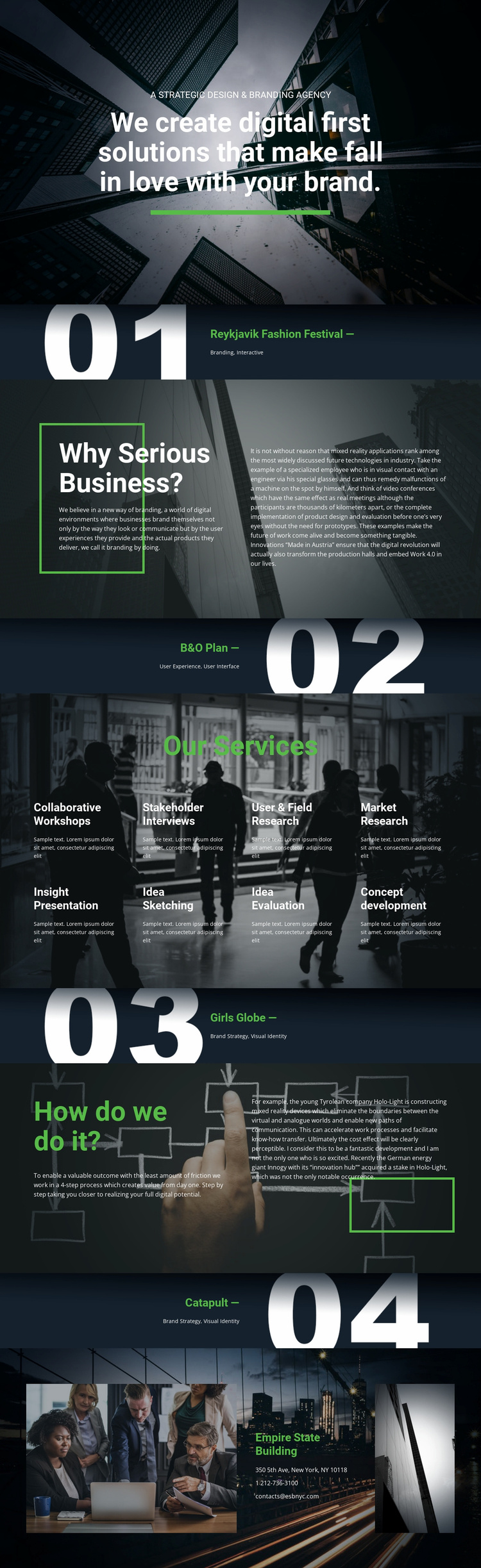
The design defines several major content areas that can anchor a broader agency website. The opening statement establishes the strategic positioning, while the four project showcases create a portfolio-oriented foundation: Reykjavik Fashion Festival introduces Branding and Interactive work, B&O Plan represents User Experience and User Interface, and Girls Globe and Catapult extend the presentation into Brand Strategy and Visual Identity. These examples give future project or case-study pages a clear relationship to the starting design without claiming that additional pages already exist.
The eight labeled services provide another useful structural category. Workshops, stakeholder interviews, market research, insight presentation, idea sketching, idea evaluation, and concept development suggest a path from investigation to solution development, while the listed branding and digital disciplines define the agency’s broader offer. The four-step working process can support a dedicated process explanation as the site grows. Contact content is already represented by a closing section with a telephone number and email address, so a future website could build from an existing route through positioning, proof, capabilities, method, and communication. The dark photographic language, white type, green accents, and split editorial blocks supply a consistent visual basis for related pages while keeping the verified design grounded in one agency presentation.
Customize with Nicepage
Open this ready-made template in the Website Template Builder and customize it visually in the Nicepage editor. Replace demo content, edit page sections, and adapt the design to your project without rebuilding the template from scratch.
Build a Complete Website From This Template
Customize the Website Visually
Use this ready-made website template as a starting point for your project and adapt its pages visually in Nicepage. Change content, images, typography, navigation, sections, and other design elements while keeping the website together as a single editable project.
Manage Website Pages in One Project
Use the Pages panel to open, add, duplicate, and manage the pages of your website. Work on individual pages while keeping navigation and the overall site structure accessible from the same project, making it easier to develop a complete website instead of managing separate page files.
Expand the Website With Matching Designs
When you need additional pages or sections, use Page Design Sets to find Page and Block Designs created in the same visual style. Design Sets group matching designs together, making it easier to expand the website with new content while maintaining a consistent look across its pages and sections.
Organize Larger Multi-Page Websites
As the website grows, use Page Folders to organize related pages and keep larger multi-page projects easier to navigate in the editor. This is especially useful for websites with separate service pages, company information, contacts, landing pages, and other content areas.
This workflow makes the template a practical foundation for building and expanding a complete website while managing its pages, content, and visual design within one Nicepage project.