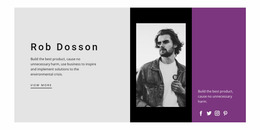
Executive leadership Website Mockup


Review the Text Column Against the Portrait’s Vertical Weight
The block’s strongest mockup relationship is the contrast between a compact left text column and a large portrait that extends vertically on the right. At a wide screen size, the centered “Leadership Consulting” heading, short divider, supporting paragraph, and “learn more” button should read as one grouped introduction, while the portrait carries separate visual weight. The very light gray background gives both regions room to remain distinct, and the warm red divider and button provide small points of emphasis.
Responsive review should focus on how this split relationship changes as available width decreases. The text must retain enough space for the paragraph about bank financing and relationships with bankers to wrap comfortably, and the button should remain visibly connected to that copy. The portrait’s height and crop also deserve attention: if the image becomes too dominant, it can pull focus away from the heading; if it becomes too small, the section may lose the visual counterbalance that defines the composition.
The generous whitespace is another important review point. Narrower layouts may need a different balance between the copy and image so the section does not become unnecessarily tall or leave an oversized gap. The interaction is static, so evaluation can concentrate on text wrapping, image scale, alignment, spacing, and the continuing contrast between the left message and right portrait rather than on motion or controls.
Customize with Nicepage
Open this ready-made template in the Website Mockup Builder and customize it visually in the Nicepage editor. Replace demo content, edit page sections, and adapt the design to your project without rebuilding the template from scratch.
Edit Template Offline
2. Create a new page or select existing
3. Click Add new block, search for id 56687 and click enter
Edit Template Online
Create Awesome Websites


Free Nicepage Builder
Keywords
Review This Block as Part of a Responsive Website Mockup
Check the Section Across Devices
Use Responsive Modes to inspect how the block appears on Large Screens, Desktops, Laptops, Tablets, and Phones. Focus on the relationships that matter inside the section: column stacking, image scale, text wrapping, card density, spacing, form width, and alignment.
Adapt the Block for Narrower Screens
Nicepage provides responsive web design tools for adjusting individual device views. Refine sizes and positions, adapt Grids, Lists, and Galleries, and hide selected Elements or Blocks on particular screen sizes when the broader page requires it.
Preview the Section Without Editing Controls
Use Live Page / Preview to evaluate the design with editor controls removed. Review the block in the context of the surrounding page rather than treating one desktop screenshot as proof of all responsive states.
This workflow makes the block one responsive unit within a website mockup, with visual review focused on the section's own content relationships and how they adapt across screen widths.