Cocktail and party dresses Web Page Design


A Tall Portrait Anchors the Mosaic Page Composition
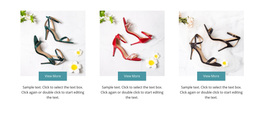
The block's page composition depends on an intentional difference in visual weight. A tall portrait photograph occupies the right column, giving the section a vertical anchor, while the left side breaks its content into two stacked image-and-text rows. That arrangement allows the eye to move between the dominant portrait, the three accessory photographs, and the two supporting paragraphs without reducing the section to a uniform grid.
The Cocktail Hour heading establishes the entry point, and the copy then adds two related styling directions: dressing for dinner or dancing and monochrome combinations with bangles and rings. The Kinley watch reference gives the editorial message a more specific center. Because the photographs and text panels alternate across the mosaic, the content can be scanned in stages while the imagery continues to supply visual emphasis.
On a single webpage, this block can work as a strong mid-page transition between broader sections. Its dark navy background contains the composition, while the pale and blue gradient panels mark the reading zones. The serif heading and smaller italic and regular text create a hierarchy that differs from the photographs without competing with the tall image. The surrounding page can provide the sections before and after it; this block contributes one clearly bounded visual and informational unit.
Customize with Nicepage
Open this ready-made template in the Web Page Design Builder and customize it visually in the Nicepage editor. Replace demo content, edit page sections, and adapt the design to your project without rebuilding the template from scratch.
Edit Template Offline
2. Create a new page or select existing
3. Click Add new block, search for id 69377 and click enter
Edit Template Online
Create Awesome Websites


Free Nicepage Builder
Keywords
Design a Web Page With This Block as One Section
Place the Block in the Page Composition
Use Block Designs to combine individual sections into a complete page. The analyzed block contributes one part of that composition, while other sections can handle the introduction, services, proof, portfolio, pricing, contact, or other page-level needs.
Refine the Elements Inside the Block
Use Web Page Elements such as Text, Image, Hyperlink, Grid, Gallery, and other elements to refine the section's content. Adjust the existing elements without assuming that one block must carry the entire page structure.
Balance the Section With Neighboring Content
After the block is placed, refine its spacing, image scale, text density, alignment, and background treatment so the transition into and out of the section feels intentional. Reorder Blocks at the page level when necessary while keeping the internal composition of each section coherent.
This workflow treats the block as one compositional unit in a web page: internally designed, visually distinct, and coordinated with the sections around it.