Dictionary Translation Bureau One Page Template


Edit Template Offline
2. Create new page and search for id 6653798
Edit Template Online
Create Awesome Websites


Free Nicepage Builder
Keywords
Services, Expertise, and Process Create Distinct One-Page Destinations
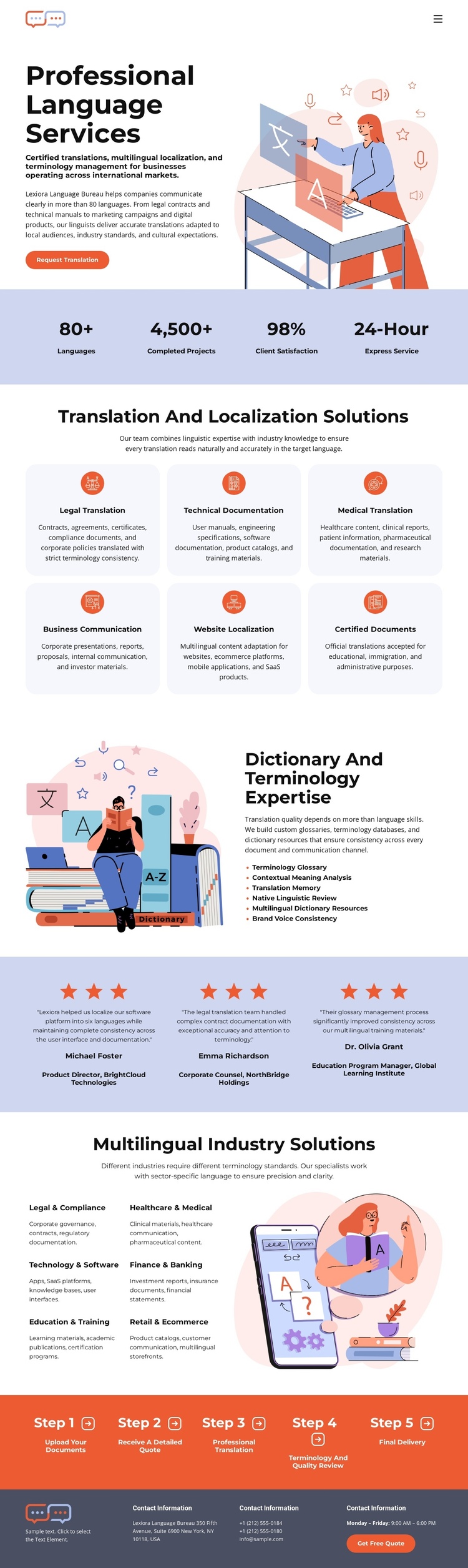
The page contains several substantial information zones that can be explored as a continuous content journey. The opening language-services section introduces the subject, while the four-item metric band provides a compact summary before visitors reach the six-card translation and localization area. That grid can function as a central services destination, with each card contributing to the same offer rather than requiring the visitor to leave the page for a separate introductory explanation.
The later sections create additional destinations within the same document. Dictionary and terminology expertise gives specialized context, and the industry solution list organizes the offer around legal and compliance, healthcare and medical, technology and software, and education and training. The testimonial band provides a separate reassurance point, while the five numbered steps make the service process easy to follow as part of the page’s continuing sequence. The dark contact footer serves as the final destination for contact details and the quote action.
This arrangement supports one-page information architecture because the sections have distinct roles without breaking the visitor experience across multiple URLs. The page can be understood in order from introduction to services, expertise, industries, proof, process, and contact. The analysis confirms mobile navigation but does not verify anchor links, so navigation should be treated as a potential adaptation rather than an existing fact.
Customize with Nicepage
Open this ready-made template in the One Page Template Builder and customize it visually in the Nicepage editor. Replace demo content, edit page sections, and adapt the design to your project without rebuilding the template from scratch.
Build a Navigable One-Page Website
Connect the Menu to Page Sections
Organize the website as a sequence of sections on a single page and use the Menu For One-Page Site to connect menu items with individual page Blocks. Visitors can jump directly to sections such as About, Services, Testimonials, or Contact without opening separate pages.
Keep the Website on One URL
A one-page template can combine several parts of a small website within one continuous page. Arrange the Header, introduction, services, portfolio, company information, reviews, contact details, and other relevant sections in the order that fits the project while keeping them accessible through the same page navigation.
Make Long Pages Easier to Navigate
For longer one-page websites, keep navigation labels short and connected to meaningful sections so visitors can move through the page without relying only on scrolling. You can also use the Back To Top element to provide a quick way back to the beginning after longer sections.
This workflow makes the template suitable for compact websites that need several distinct content sections while keeping the complete visitor experience on one URL.