Facts and questions psge One Page Template


Edit Template Offline
2. Create new page and search for id 6324511
Edit Template Online
Create Awesome Websites


Free Nicepage Builder
Keywords
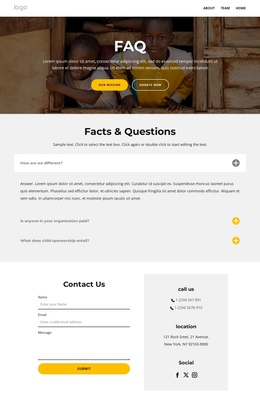
Hero, accordion, map, and footer form a continuous FAQ route
The page’s sections create a straightforward sequence for visitors who need information before making contact. The hero acts as the opening destination, combining the FAQ title with introductory copy and two visible actions. From there, the light gray Facts & Questions area changes the density of the page and gives the visitor a dedicated destination for three expandable questions. The accordion keeps answers within the same document, so the explanatory stage does not require a separate page.
The following contact section adds another meaningful destination rather than simply repeating the FAQ content. A map occupies one side and the form occupies the other, with name, email, message, and Submit elements defining the interaction. The dark footer then closes the page with quick links, social links, contact channels, and a lower navigation row. Its compact columns function as a final shared information area after the main content journey.
These relationships make the design suitable for a one-page structure in which several content purposes remain accessible within one URL: introduction, questions, location, contact, and footer navigation. The presence of Donate now supports action, but the broader organization is not only a conversion funnel. Its main strength is allowing visitors to move through distinct information destinations without breaking the FAQ experience into separate pages.
Customize with Nicepage
Open this ready-made template in the One Page Template Builder and customize it visually in the Nicepage editor. Replace demo content, edit page sections, and adapt the design to your project without rebuilding the template from scratch.
Build a Navigable One-Page Website
Connect the Menu to Page Sections
Organize the website as a sequence of sections on a single page and use the Menu For One-Page Site to connect menu items with individual page Blocks. Visitors can jump directly to sections such as About, Services, Testimonials, or Contact without opening separate pages.
Keep the Website on One URL
A one-page template can combine several parts of a small website within one continuous page. Arrange the Header, introduction, services, portfolio, company information, reviews, contact details, and other relevant sections in the order that fits the project while keeping them accessible through the same page navigation.
Make Long Pages Easier to Navigate
For longer one-page websites, keep navigation labels short and connected to meaningful sections so visitors can move through the page without relying only on scrolling. You can also use the Back To Top element to provide a quick way back to the beginning after longer sections.
This workflow makes the template suitable for compact websites that need several distinct content sections while keeping the complete visitor experience on one URL.