New collection of swimwear One Page Template


Edit Template Offline
2. Create new page and search for id 32101
Edit Template Online
Create Awesome Websites


Free Nicepage Builder
Keywords
Distinct collection sections support a continuous visitor journey
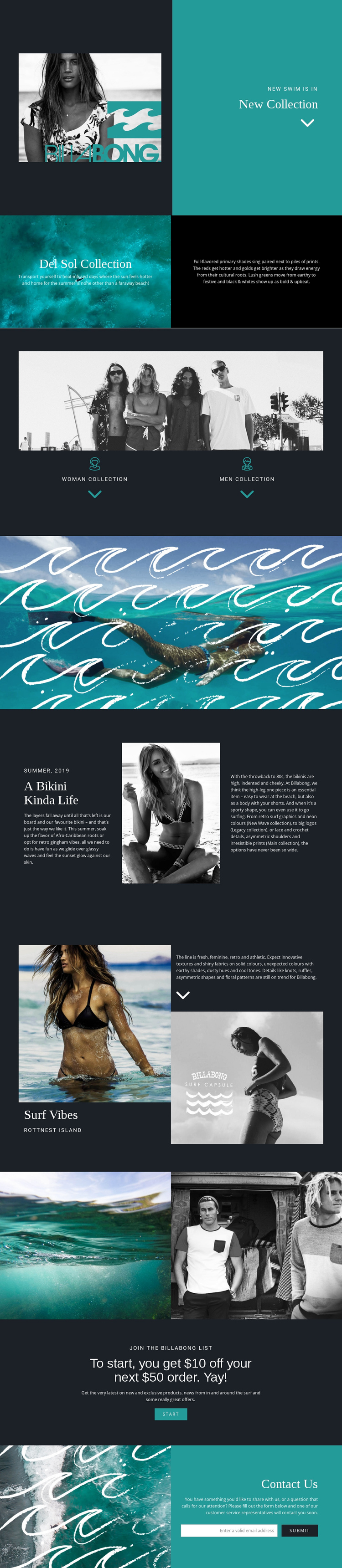
The page’s sequence gives a one-page presentation several meaningful stopping points. New Collection introduces the seasonal subject, while the Del Sol split section moves from a visual statement into descriptive collection copy. The following category area presents Woman and men as separate labels beneath a campaign photograph, allowing visitors to identify a preferred collection direction while remaining within the same document.
The long-page rhythm changes as the visitor continues. A full-width turquoise ocean image works as a visual transition, then the A Bikini Kinda Life section uses three columns to separate introductory copy, portrait imagery, and supporting text. Surf Vibes follows with interlocking images and text connected to Rottnest Island. The two-panel gallery provides another image-led destination before the page shifts from editorial browsing to response content.
At the end, the newsletter promotion and Contact Us block operate as separate destinations with different roles. The first presents a list invitation and start action; the second provides customer-service copy, an email field, and a submit action. This distinction matters for a one-page structure because visitors can navigate from collection discovery to editorial features and finally to signup or contact without leaving the continuous page. The design’s section order supplies the journey even without claiming that anchor navigation is already present.
Customize with Nicepage
Open this ready-made template in the One Page Template Builder and customize it visually in the Nicepage editor. Replace demo content, edit page sections, and adapt the design to your project without rebuilding the template from scratch.
Build a Navigable One-Page Website
Connect the Menu to Page Sections
Organize the website as a sequence of sections on a single page and use the Menu For One-Page Site to connect menu items with individual page Blocks. Visitors can jump directly to sections such as About, Services, Testimonials, or Contact without opening separate pages.
Keep the Website on One URL
A one-page template can combine several parts of a small website within one continuous page. Arrange the Header, introduction, services, portfolio, company information, reviews, contact details, and other relevant sections in the order that fits the project while keeping them accessible through the same page navigation.
Make Long Pages Easier to Navigate
For longer one-page websites, keep navigation labels short and connected to meaningful sections so visitors can move through the page without relying only on scrolling. You can also use the Back To Top element to provide a quick way back to the beginning after longer sections.
This workflow makes the template suitable for compact websites that need several distinct content sections while keeping the complete visitor experience on one URL.