Travel Live One Page Template


Edit Template Offline
2. Create new page and search for id 29758
Edit Template Online
Create Awesome Websites


Free Nicepage Builder
Keywords
From Paris to World Travel, the Sections Create One Continuous Journey
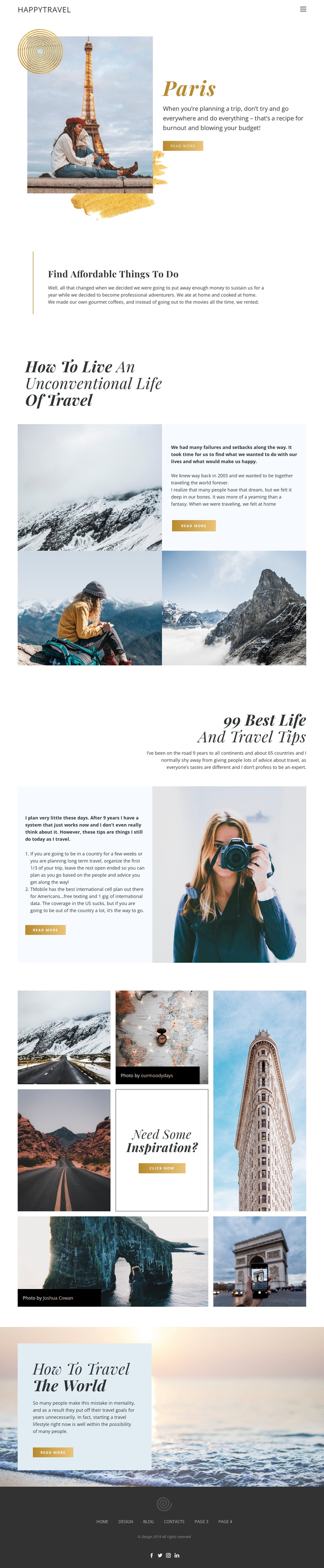
The page has a clear sequence of destinations and editorial themes that can be explored without leaving the document. Paris provides the opening content destination, combining travel photography, a description, and a read-more action. The following centered section narrows the subject to affordable things to do, creating a practical stop in the journey. A personal travel story then broadens the perspective through mountain images and narrative text, before the ordered “99 Best Life and Travel Tips” feature adds a more reference-like destination within the same page.
The seven-image mosaic changes the visual rhythm and acts as a separate inspiration point. Its varied travel photographs, credit labels, and central “Need some Inspiration?” prompt give the long layout a strong visual landmark. The wide ocean image near the end provides another recognizable destination, this time attached to “How to travel the world” and a further read-more action. These sections are sufficiently distinct to support meaningful navigation destinations, even though the analysis does not verify anchor links in the existing menu.
The compact header and dark footer frame the sequence, with navigation at the top and secondary links plus social icons at the bottom. The result is a continuous travel content experience: destination, advice, story, tips, visual discovery, and closing encouragement remain part of one page rather than requiring separate URLs.
Customize with Nicepage
Open this ready-made template in the One Page Template Builder and customize it visually in the Nicepage editor. Replace demo content, edit page sections, and adapt the design to your project without rebuilding the template from scratch.
Build a Navigable One-Page Website
Connect the Menu to Page Sections
Organize the website as a sequence of sections on a single page and use the Menu For One-Page Site to connect menu items with individual page Blocks. Visitors can jump directly to sections such as About, Services, Testimonials, or Contact without opening separate pages.
Keep the Website on One URL
A one-page template can combine several parts of a small website within one continuous page. Arrange the Header, introduction, services, portfolio, company information, reviews, contact details, and other relevant sections in the order that fits the project while keeping them accessible through the same page navigation.
Make Long Pages Easier to Navigate
For longer one-page websites, keep navigation labels short and connected to meaningful sections so visitors can move through the page without relying only on scrolling. You can also use the Back To Top element to provide a quick way back to the beginning after longer sections.
This workflow makes the template suitable for compact websites that need several distinct content sections while keeping the complete visitor experience on one URL.