Discover highs of education One Page Template


Edit Template Offline
2. Create new page and search for id 16615
Edit Template Online
Create Awesome Websites


Free Nicepage Builder
Keywords
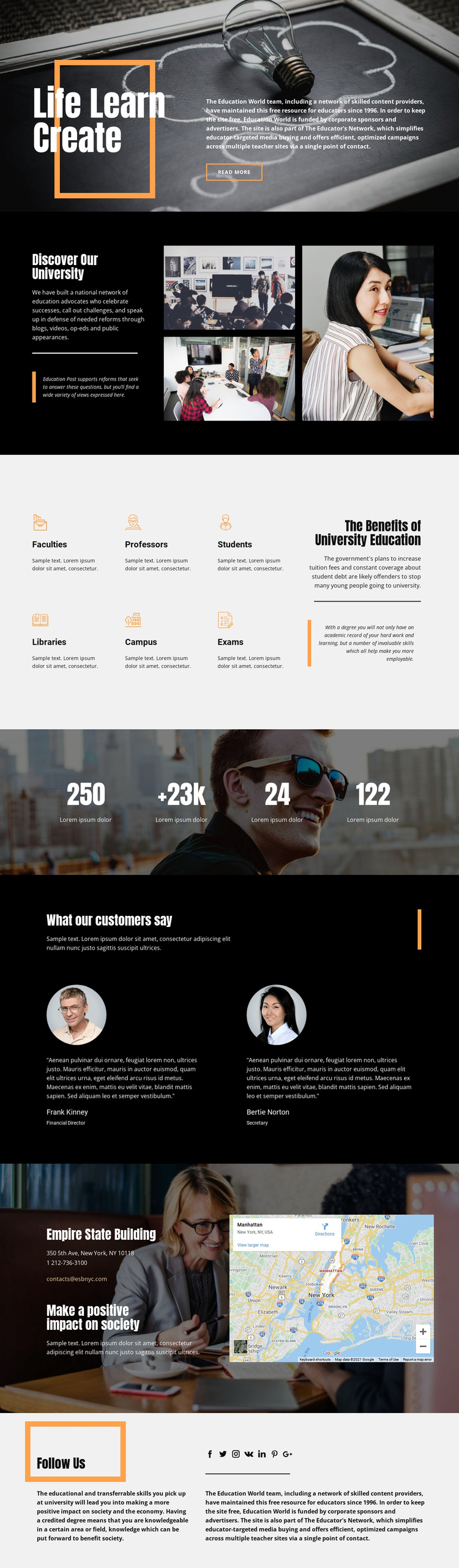
Seven content zones form a continuous university journey
The page has a clear sequence that can be read from top to bottom without requiring separate documents. “Life Learn Create” introduces the university theme through a text-over-image hero and a read-more link. “Discover Our University” follows with editorial copy and a three-image collage, giving the introduction its own destination. The six-item benefits area then shifts attention to Faculties, Professors, Students, Libraries, Campus, and Exams, followed by a larger explanatory panel.
The later sections continue the journey rather than repeating the opening message. A photographic band presents four numeric highlights as visual emphasis, while the “What our customers say” area separates two portrait-based testimonials into a dedicated proof and commentary zone. The contact block provides another meaningful destination by combining a location name, address, phone number, email address, and map panel. Finally, “Follow Us” presents social links and education-related supporting text as the closing section.
This sequence gives the design the logic of a one-page information architecture: each major subject occupies a recognizable portion of the same document. The sections can be treated as navigation destinations if the project adds suitable menu or anchor behavior, but such navigation is not verified in the analysis. Its main strength is the progression from broad university introduction to subject coverage, supporting voices, practical contact information, and social continuation.
Customize with Nicepage
Open this ready-made template in the One Page Template Builder and customize it visually in the Nicepage editor. Replace demo content, edit page sections, and adapt the design to your project without rebuilding the template from scratch.
Build a Navigable One-Page Website
Connect the Menu to Page Sections
Organize the website as a sequence of sections on a single page and use the Menu For One-Page Site to connect menu items with individual page Blocks. Visitors can jump directly to sections such as About, Services, Testimonials, or Contact without opening separate pages.
Keep the Website on One URL
A one-page template can combine several parts of a small website within one continuous page. Arrange the Header, introduction, services, portfolio, company information, reviews, contact details, and other relevant sections in the order that fits the project while keeping them accessible through the same page navigation.
Make Long Pages Easier to Navigate
For longer one-page websites, keep navigation labels short and connected to meaningful sections so visitors can move through the page without relying only on scrolling. You can also use the Back To Top element to provide a quick way back to the beginning after longer sections.
This workflow makes the template suitable for compact websites that need several distinct content sections while keeping the complete visitor experience on one URL.