Digital Art Museum One Page Template


Edit Template Offline
2. Create new page and search for id 14287
Edit Template Online
Create Awesome Websites


Free Nicepage Builder
Keywords
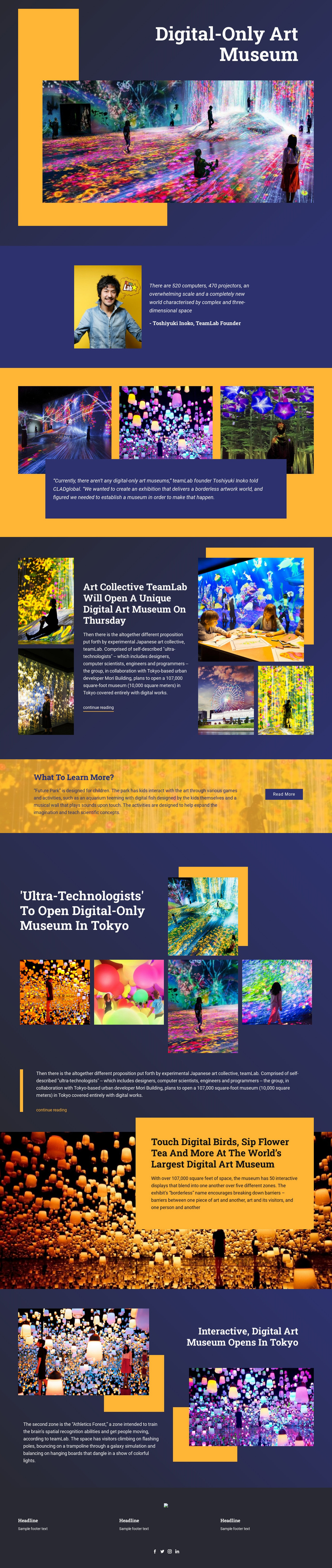
Museum Coverage Progresses Through Distinct Single-Page Destinations
The page supports a continuous content journey because each major section has a different informational role. The opening text-on-image area introduces the digital-only museum, and the following split composition gives readers a founder quotation and portrait before the first three-image artwork gallery. That order creates a natural beginning: subject, voice, then visual material. The centered quotation panel keeps the gallery from functioning as an isolated image strip by connecting it to the museum statement.
The next destinations broaden the story without moving to separate page concepts. The teamLab article explains the proposed museum and includes a continue-reading link. Future Park then narrows the subject to children-focused educational activities, using a full-width image and a small button. Another gallery-led section returns to broader Tokyo coverage, pairing an article excerpt with one featured artwork and four more images. The page can therefore offer several meaningful stops while retaining one shared editorial context.
The final text-on-image section describes interactive experiences, including digital birds and flower tea, before the opposing image-and-text compositions introduce Athletics Forest and its focus on spatial recognition and movement. Three footer information columns and social icons close the sequence. This combination of changing section formats and recurring museum themes gives the visitor multiple content destinations within one continuous document, while the dark navy and golden accents help connect those destinations visually.
Customize with Nicepage
Open this ready-made template in the One Page Template Builder and customize it visually in the Nicepage editor. Replace demo content, edit page sections, and adapt the design to your project without rebuilding the template from scratch.
Build a Navigable One-Page Website
Connect the Menu to Page Sections
Organize the website as a sequence of sections on a single page and use the Menu For One-Page Site to connect menu items with individual page Blocks. Visitors can jump directly to sections such as About, Services, Testimonials, or Contact without opening separate pages.
Keep the Website on One URL
A one-page template can combine several parts of a small website within one continuous page. Arrange the Header, introduction, services, portfolio, company information, reviews, contact details, and other relevant sections in the order that fits the project while keeping them accessible through the same page navigation.
Make Long Pages Easier to Navigate
For longer one-page websites, keep navigation labels short and connected to meaningful sections so visitors can move through the page without relying only on scrolling. You can also use the Back To Top element to provide a quick way back to the beginning after longer sections.
This workflow makes the template suitable for compact websites that need several distinct content sections while keeping the complete visitor experience on one URL.