
No Connection Page Joomla Template


Edit Template Offline
2. Create new page and search for id 6658547
Edit Template Online
Create Awesome Websites


Free Nicepage Builder
Keywords
Status, guidance, and check-in support divide the content into managed regions
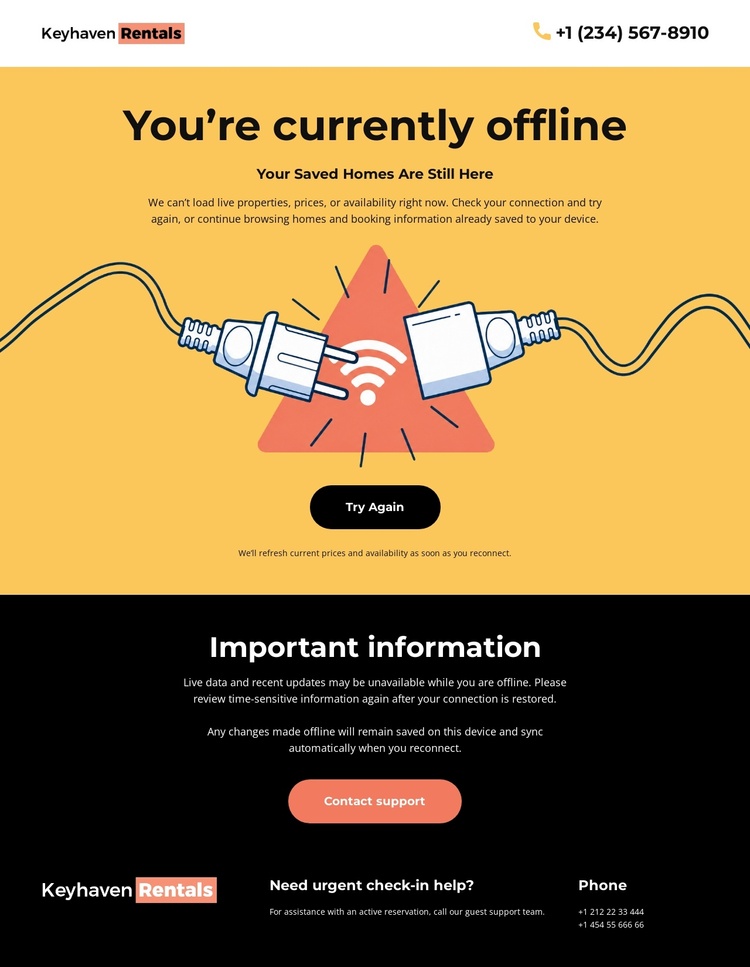
The page’s content is already divided into practical regions that can be understood independently within a CMS-managed rental site. The header contains the shared identity and phone contact, while the central yellow section handles the temporary service condition. Its offline heading, illustration, saved-homes message, retry action, and support action belong together because they answer what happened and what the visitor can do next.
The black information panel serves a different editorial role. It holds offline-use guidance rather than another action, giving the project a dedicated area for instructions or service notes. The footer then gathers urgent check-in help, support copy, phone contact, and Keyhaven Rentals branding into a closing support region. This separation can help keep operational information distinct from the primary status message as content is maintained over time.
For a Joomla project, the design therefore offers a clear content hierarchy without requiring the page to be treated as a generic article. The recurring header and footer regions can frame the service message, while the central and information areas carry page-specific status content. The Nicepage Joomla Extension is an optional bridge when this visual arrangement needs to remain connected to Joomla-managed page content, but the template itself does not claim that Joomla Articles or module positions already exist.
Customize with Nicepage
Open this ready-made template in the Joomla Page Builder and customize it visually in the Nicepage editor. Replace demo content, edit page sections, and adapt the design to your project without rebuilding the template from scratch.
Work With This Template in Joomla
Customize and Install the Joomla Template
Start with this ready-made template instead of building the Joomla design from scratch. Customize its layout, content, typography, images, sections, and other design elements visually in the Nicepage application, then export and install the Joomla Template, Nicepage Extension, and supported content on your Joomla website.
Edit the Template Directly in Joomla
After installation, you can edit the Joomla Template directly in Joomla with the Nicepage Joomla Extension. Customize the Header, Footer, Colors, Fonts, typography, and Page Templates from the Joomla workflow while keeping the site design connected with your CMS content.
Edit Joomla Articles Visually
Use the Nicepage Joomla Extension to open and edit Joomla Articles visually from the Joomla Administrator. Change text, images, sections, layouts, and other page content in the Nicepage editor while continuing to manage the Articles through Joomla.
Joomla Content and Template Integration
Use the customized template together with Joomla Articles, module Positions, menus, forms, Blog Pages, and other supported CMS elements. With the Nicepage Extension used as the Site Style Source, shared design settings can be applied across Joomla Articles while Joomla continues to provide the CMS environment for managing site content.
This workflow combines a ready-made Joomla Template with visual customization, direct template editing in Joomla, and continued content management through the Nicepage Joomla Extension.
