
Offline Page Website Joomla Template


Edit Template Offline
2. Create new page and search for id 6658534
Edit Template Online
Create Awesome Websites


Free Nicepage Builder
Keywords
Status Content and Support Regions Suit a Structured CMS Page
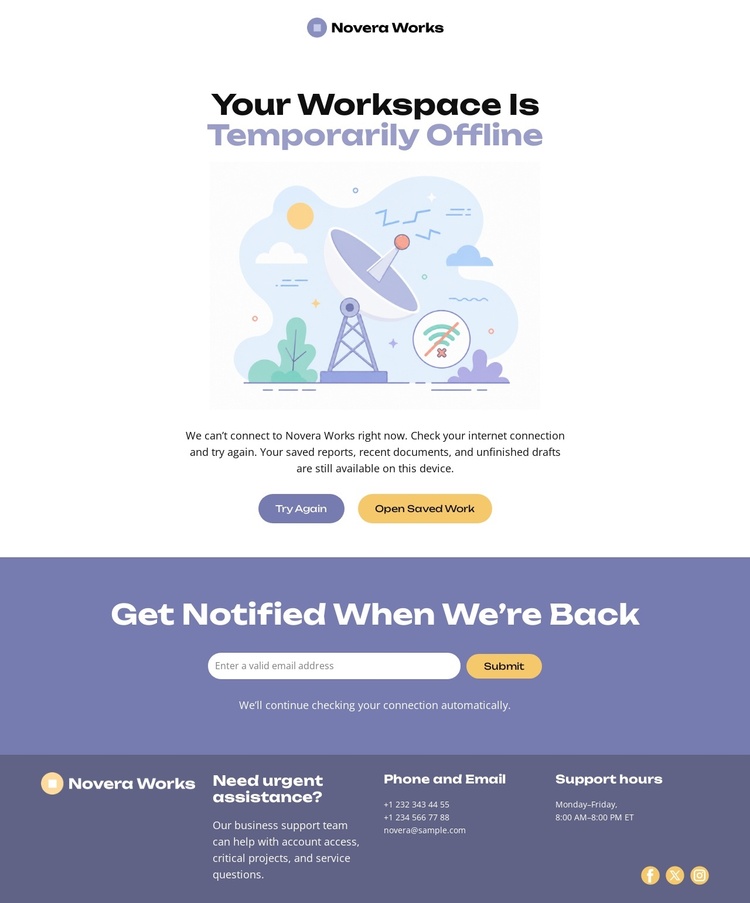
The design divides the outage experience into content regions that can be understood independently while remaining visually coordinated. The central area communicates the current workspace status through a heading, illustration, and short explanation, then places Try Again and Open Saved Work beneath it as immediate recovery choices. The following notification block serves a different purpose: it captures an email request from visitors who want to know when the service returns. The footer gathers support information, operating hours, phone and email channels, and social links into a final reference region.
This division is useful for a Joomla-managed implementation because the page does not rely on one undifferentiated message. Status text, recovery labels, notification wording, and support details are visibly separate kinds of content that can be maintained according to their roles. The shared wordmark and consistent lavender treatment keep those regions connected, while the darker footer clearly marks the transition to assistance information.
The result is a practical CMS content structure for an outage page: a primary notice, action labels, a subscription area, and support contacts. Joomla can provide the site environment for organizing those sections while the design preserves the concise sequence from explanation to recovery, return notification, and escalation.
Customize with Nicepage
Open this ready-made template in the Joomla Page Builder and customize it visually in the Nicepage editor. Replace demo content, edit page sections, and adapt the design to your project without rebuilding the template from scratch.
Work With This Template in Joomla
Customize and Install the Joomla Template
Start with this ready-made template instead of building the Joomla design from scratch. Customize its layout, content, typography, images, sections, and other design elements visually in the Nicepage application, then export and install the Joomla Template, Nicepage Extension, and supported content on your Joomla website.
Edit the Template Directly in Joomla
After installation, you can edit the Joomla Template directly in Joomla with the Nicepage Joomla Extension. Customize the Header, Footer, Colors, Fonts, typography, and Page Templates from the Joomla workflow while keeping the site design connected with your CMS content.
Edit Joomla Articles Visually
Use the Nicepage Joomla Extension to open and edit Joomla Articles visually from the Joomla Administrator. Change text, images, sections, layouts, and other page content in the Nicepage editor while continuing to manage the Articles through Joomla.
Joomla Content and Template Integration
Use the customized template together with Joomla Articles, module Positions, menus, forms, Blog Pages, and other supported CMS elements. With the Nicepage Extension used as the Site Style Source, shared design settings can be applied across Joomla Articles while Joomla continues to provide the CMS environment for managing site content.
This workflow combines a ready-made Joomla Template with visual customization, direct template editing in Joomla, and continued content management through the Nicepage Joomla Extension.
