Key Insight Joomla Template


Structured Analytics Content for a Joomla-Managed Page
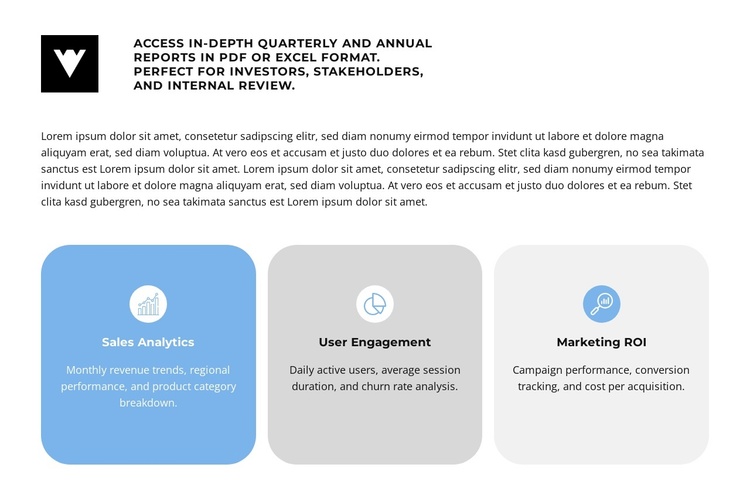
The heading and supporting paragraph establish a compact information area before the block moves into three clearly separated reporting categories. Sales Analytics describes monthly revenue trends, regional performance, and product category breakdowns. User Engagement focuses on daily active users, average session duration, and churn rate analysis. Marketing ROI addresses campaign performance, conversion tracking, and cost per acquisition. Together, these cards form a structured information region rather than an undifferentiated list.
Within a Joomla-managed page, the section can provide a stable visual area for this kind of categorized business information while surrounding content continues to serve other editorial or site purposes. The repeated card pattern makes the categories easy to compare, and the rounded containers give each group a visible boundary. The upper report statement adds context by referring to quarterly and annual reports in PDF or Excel format, so the cards read as supporting areas within one reporting subject.
The block’s static behavior keeps the content immediately visible, which suits a page section intended to communicate several related categories at once. Its blue, gray, and pale-gray cards can also provide a recognizable visual region within the broader Joomla-oriented composition. The result is a reusable content area that preserves the reporting hierarchy while fitting naturally among other managed page sections.
Customize with Nicepage
Open this ready-made template in the Joomla Page Builder and customize it visually in the Nicepage editor. Replace demo content, edit page sections, and adapt the design to your project without rebuilding the template from scratch.
Edit Template Offline
2. Create a new page or select existing
3. Click Add new block, search for id 6556720 and click enter
Edit Template Online
Create Awesome Websites


Free Nicepage Builder
Keywords
Work With This Template in Joomla
Customize and Install the Joomla Template
Start with this ready-made template instead of building the Joomla design from scratch. Customize its layout, content, typography, images, sections, and other design elements visually in the Nicepage application, then export and install the Joomla Template, Nicepage Extension, and supported content on your Joomla website.
Edit the Template Directly in Joomla
After installation, you can edit the Joomla Template directly in Joomla with the Nicepage Joomla Extension. Customize the Header, Footer, Colors, Fonts, typography, and Page Templates from the Joomla workflow while keeping the site design connected with your CMS content.
Edit Joomla Articles Visually
Use the Nicepage Joomla Extension to open and edit Joomla Articles visually from the Joomla Administrator. Change text, images, sections, layouts, and other page content in the Nicepage editor while continuing to manage the Articles through Joomla.
Joomla Content and Template Integration
Use the customized template together with Joomla Articles, module Positions, menus, forms, Blog Pages, and other supported CMS elements. With the Nicepage Extension used as the Site Style Source, shared design settings can be applied across Joomla Articles while Joomla continues to provide the CMS environment for managing site content.
This workflow combines a ready-made Joomla Template with visual customization, direct template editing in Joomla, and continued content management through the Nicepage Joomla Extension.