Answers on main questions Joomla Template


Discount, Usage, and Update Questions Form Three Structured Content Units
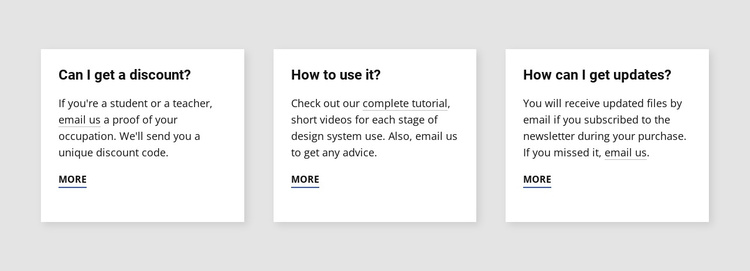
The three-card arrangement separates the section into distinct informational units that can fit naturally within a Joomla-managed page. Each unit has a question heading followed by explanatory text and a separate “more” link, so readers can identify the subject of each answer before deciding whether to continue. The repeated card pattern also keeps the three topics visually related without combining them into one dense paragraph.
The first card addresses discount questions and includes student or teacher eligibility in its answer. The second focuses on usage, referring readers to a complete tutorial and short videos for further guidance. The third concerns updates and explains that revised files can be received by email after newsletter subscription. These topics can be maintained as a compact FAQ-oriented content region while the surrounding Joomla project handles broader page organization and editorial content.
Visually, the light gray section background frames three white cards with subtle shadows. Equal horizontal spacing makes the questions easy to compare, while dark, left-aligned typography preserves a straightforward reading order. Compact spacing keeps the block from becoming unnecessarily tall, and the underlined action links mark the points where additional information can be reached. The result is a stable structured section for answering common questions, not a complete CMS template or site.
Customize with Nicepage
Open this ready-made template in the Joomla Page Builder and customize it visually in the Nicepage editor. Replace demo content, edit page sections, and adapt the design to your project without rebuilding the template from scratch.
Edit Template Offline
2. Create a new page or select existing
3. Click Add new block, search for id 529377 and click enter
Edit Template Online
Create Awesome Websites


Free Nicepage Builder
Keywords
Work With This Template in Joomla
Customize and Install the Joomla Template
Start with this ready-made template instead of building the Joomla design from scratch. Customize its layout, content, typography, images, sections, and other design elements visually in the Nicepage application, then export and install the Joomla Template, Nicepage Extension, and supported content on your Joomla website.
Edit the Template Directly in Joomla
After installation, you can edit the Joomla Template directly in Joomla with the Nicepage Joomla Extension. Customize the Header, Footer, Colors, Fonts, typography, and Page Templates from the Joomla workflow while keeping the site design connected with your CMS content.
Edit Joomla Articles Visually
Use the Nicepage Joomla Extension to open and edit Joomla Articles visually from the Joomla Administrator. Change text, images, sections, layouts, and other page content in the Nicepage editor while continuing to manage the Articles through Joomla.
Joomla Content and Template Integration
Use the customized template together with Joomla Articles, module Positions, menus, forms, Blog Pages, and other supported CMS elements. With the Nicepage Extension used as the Site Style Source, shared design settings can be applied across Joomla Articles while Joomla continues to provide the CMS environment for managing site content.
This workflow combines a ready-made Joomla Template with visual customization, direct template editing in Joomla, and continued content management through the Nicepage Joomla Extension.