The largest consulting firm Joomla Template



Structured Capability Content for a Joomla-Managed Page
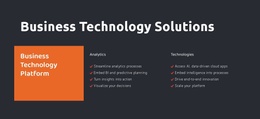
The “Business Technology Solutions” heading gives this section a concise subject before the content divides into three related regions. The left region highlights Business Technology Platform in a solid orange panel. The center Analytics group contains four statements about streamlining processes, embedding BI and predictive planning, turning insights into action, and visualizing decisions. The right Technologies group contains four statements about AI and data-driven cloud applications, embedded intelligence, end-to-end innovation, and platform scaling. Together, these groups present a compact, structured view of technology capabilities.
Within a Joomla-oriented project, the block can function as a stable informational region on a page while the wider site manages its other content areas. Its value comes from the way the categories remain visually separate but conceptually connected: the platform panel establishes the primary subject, and the two lists provide supporting areas that can be read independently. The three-column arrangement also gives editors a predictable content pattern for reviewing or adapting the section without collapsing the distinctions between categories.
The visual treatment strengthens that content model. White typography remains legible against the charcoal background, the orange panel signals the highlighted category, and red check marks help visitors scan the capability statements. This makes the block suitable for a Joomla-managed services or solutions page where structured business information needs a strong, reusable presentation without expanding the section into a complete site or template.
Customize with Nicepage
Open this ready-made template in the Joomla Page Builder and customize it visually in the Nicepage editor. Replace demo content, edit page sections, and adapt the design to your project without rebuilding the template from scratch.
Edit Template Offline
2. Create a new page or select existing
3. Click Add new block, search for id 4597281 and click enter
Edit Template Online
Create Awesome Websites


Free Nicepage Builder
Keywords
Work With This Template in Joomla
Customize and Install the Joomla Template
Start with this ready-made template instead of building the Joomla design from scratch. Customize its layout, content, typography, images, sections, and other design elements visually in the Nicepage application, then export and install the Joomla Template, Nicepage Extension, and supported content on your Joomla website.
Edit the Template Directly in Joomla
After installation, you can edit the Joomla Template directly in Joomla with the Nicepage Joomla Extension. Customize the Header, Footer, Colors, Fonts, typography, and Page Templates from the Joomla workflow while keeping the site design connected with your CMS content.
Edit Joomla Articles Visually
Use the Nicepage Joomla Extension to open and edit Joomla Articles visually from the Joomla Administrator. Change text, images, sections, layouts, and other page content in the Nicepage editor while continuing to manage the Articles through Joomla.
Joomla Content and Template Integration
Use the customized template together with Joomla Articles, module Positions, menus, forms, Blog Pages, and other supported CMS elements. With the Nicepage Extension used as the Site Style Source, shared design settings can be applied across Joomla Articles while Joomla continues to provide the CMS environment for managing site content.
This workflow combines a ready-made Joomla Template with visual customization, direct template editing in Joomla, and continued content management through the Nicepage Joomla Extension.