Text and button in cells Joomla Template


Structured Signup and Contact Content in Two Regions
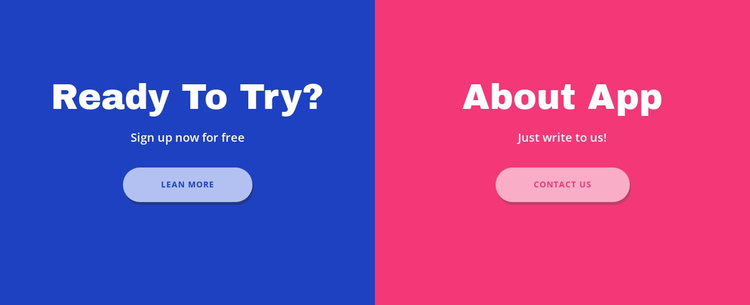
The left and right panels divide the section into two understandable content units. The blue side groups the heading “Ready To Try?” with the supporting phrase “Sign up now for free” and the “Learn More” action. The pink side groups “About App” with “Just write to us!” and the “Contact Us” action. Because each unit has a heading, short description, and button, the content can be treated as two related information areas while retaining one consistent visual section.
Within a Joomla-oriented page composition, this arrangement can serve as a stable content region for presenting separate routes to continue. The block’s structured distinction is more important than any particular CMS object: one panel communicates an invitation to begin, and the other presents a way to make contact. Equal widths and centered stacks give both units comparable emphasis, while the blue and pink backgrounds help visitors identify the difference quickly. Joomla-managed content around the section can provide additional context or neighboring page areas, while this block keeps its own paired CTA purpose. The repeated button shape and typography also make the section easier to coordinate with related content regions without flattening the difference between signup and contact.
Customize with Nicepage
Open this ready-made template in the Joomla Page Builder and customize it visually in the Nicepage editor. Replace demo content, edit page sections, and adapt the design to your project without rebuilding the template from scratch.
Edit Template Offline
2. Create a new page or select existing
3. Click Add new block, search for id 317874 and click enter
Edit Template Online
Create Awesome Websites


Free Nicepage Builder
Keywords
Work With This Template in Joomla
Customize and Install the Joomla Template
Start with this ready-made template instead of building the Joomla design from scratch. Customize its layout, content, typography, images, sections, and other design elements visually in the Nicepage application, then export and install the Joomla Template, Nicepage Extension, and supported content on your Joomla website.
Edit the Template Directly in Joomla
After installation, you can edit the Joomla Template directly in Joomla with the Nicepage Joomla Extension. Customize the Header, Footer, Colors, Fonts, typography, and Page Templates from the Joomla workflow while keeping the site design connected with your CMS content.
Edit Joomla Articles Visually
Use the Nicepage Joomla Extension to open and edit Joomla Articles visually from the Joomla Administrator. Change text, images, sections, layouts, and other page content in the Nicepage editor while continuing to manage the Articles through Joomla.
Joomla Content and Template Integration
Use the customized template together with Joomla Articles, module Positions, menus, forms, Blog Pages, and other supported CMS elements. With the Nicepage Extension used as the Site Style Source, shared design settings can be applied across Joomla Articles while Joomla continues to provide the CMS environment for managing site content.
This workflow combines a ready-made Joomla Template with visual customization, direct template editing in Joomla, and continued content management through the Nicepage Joomla Extension.