Trends sharping cities Joomla Template


Structured Urban Insights for a Joomla Content Region
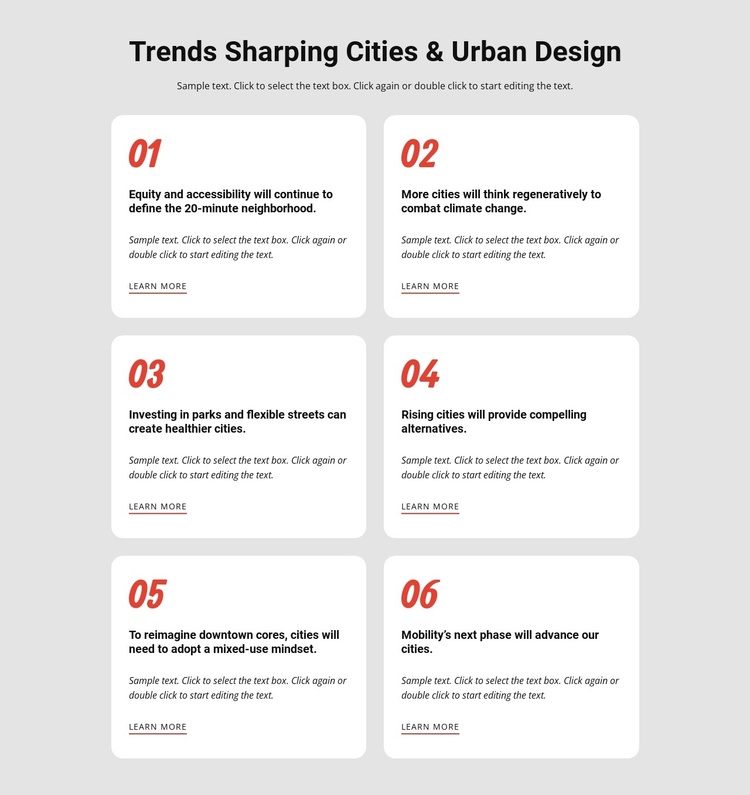
The heading and supporting paragraph give the section a defined subject before the six trend cards divide that subject into manageable information units. In a Joomla-managed page, this structure can function as a reusable urban design insights region: the card pattern keeps each topic visually independent, while the shared grid preserves a coherent relationship between them. The block remains one section within the broader page, with surrounding navigation and other content handled elsewhere.
The six items offer several distinct editorial directions. One discusses equity and accessibility in the 20-minute neighborhood; another focuses on regenerative approaches to climate change. Additional cards connect parks and flexible streets with healthier cities, consider rising cities as alternatives, address mixed-use downtown cores, and introduce the next phase of mobility. These topics make the section suitable for structured informational content rather than a single undifferentiated statement.
Its presentation also supports stable CMS-managed use. The centered introduction establishes the region, the two-column grid distributes the six cards over three rows, and each card repeats the same title, description, and learn-more relationship. White rounded cards stand out from the light gray background, while red numbers provide an immediate visual index against black typography. In a Joomla-oriented project, that combination can preserve a recognizable content area as related articles or page regions develop around it.
Customize with Nicepage
Open this ready-made template in the Joomla Page Builder and customize it visually in the Nicepage editor. Replace demo content, edit page sections, and adapt the design to your project without rebuilding the template from scratch.
Edit Template Offline
2. Create a new page or select existing
3. Click Add new block, search for id 1382073 and click enter
Edit Template Online
Create Awesome Websites


Free Nicepage Builder
Keywords
Work With This Template in Joomla
Customize and Install the Joomla Template
Start with this ready-made template instead of building the Joomla design from scratch. Customize its layout, content, typography, images, sections, and other design elements visually in the Nicepage application, then export and install the Joomla Template, Nicepage Extension, and supported content on your Joomla website.
Edit the Template Directly in Joomla
After installation, you can edit the Joomla Template directly in Joomla with the Nicepage Joomla Extension. Customize the Header, Footer, Colors, Fonts, typography, and Page Templates from the Joomla workflow while keeping the site design connected with your CMS content.
Edit Joomla Articles Visually
Use the Nicepage Joomla Extension to open and edit Joomla Articles visually from the Joomla Administrator. Change text, images, sections, layouts, and other page content in the Nicepage editor while continuing to manage the Articles through Joomla.
Joomla Content and Template Integration
Use the customized template together with Joomla Articles, module Positions, menus, forms, Blog Pages, and other supported CMS elements. With the Nicepage Extension used as the Site Style Source, shared design settings can be applied across Joomla Articles while Joomla continues to provide the CMS environment for managing site content.
This workflow combines a ready-made Joomla Template with visual customization, direct template editing in Joomla, and continued content management through the Nicepage Joomla Extension.