Technikai segítség Weboldal tervezés


Az élénk véleménypanelek letisztult vizuális nyelvet visznek tovább
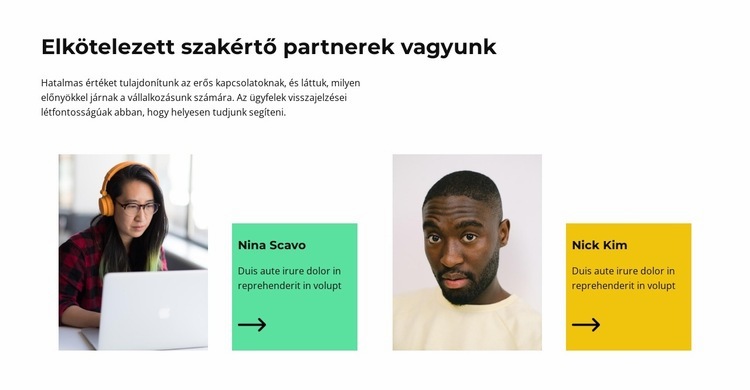
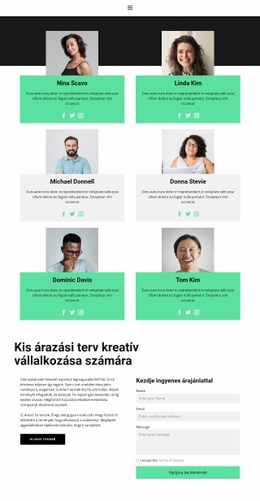
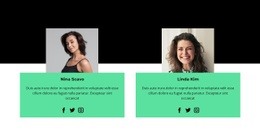
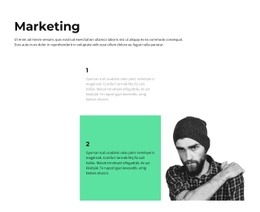
A szekció vizuális nyelve a kontraszttal indul: a fehér háttér és a határozott fekete címsor visszafogott alapot teremt, míg a véleménykártyák élénk menta és sárgászöld paneleket hoznak a felületre. Ezek a színek nem csupán díszítik a bejegyzéseket: elválasztják a leírt visszajelzést a mellette lévő portrétól, és egyértelmű szerepet adnak az ismétlődő kártyáknak a szekción belül. A felettük található tömör kísérő bekezdés szintén balra zárt, fegyelmezett megjelenést biztosít.
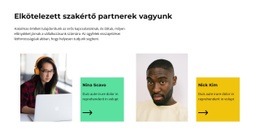
Mindkét kártya ugyanazt a vizuális mintát követi. Az egyik oldalon portré látható, míg a másikon egy határozott, téglalap alakú színes mező tartalmazza a személy nevét, a leírást és a nyíl ikont. Ennek a megoldásnak a megismétlése mindkét kártyánál következetességet teremt anélkül, hogy a kártyák teljesen egyformának tűnnének. Az elemek körüli bőséges negatív tér megakadályozza, hogy az élénk panelek elnyomják a címsort, míg a fekete tipográfia gondoskodik az optimális olvashatóságról a világos háttér előtt.
A tágabb weboldaltervezés részeként ez a blokk felismerhető elrendezést kínál a visszajelzések bemutatására, amelyet a kapcsolódó szekciók a térközök, téglalap alakzatok, kiemelő színek vagy a kép-szöveg kapcsolatok révén visszhangozhatnak. Ezt a blokkot az átfogó vizuális nyelv egyik megnyilvánulásaként érdemes értelmezni, nem pedig a teljes webhely identitásának kizárólagos alapjaként. A megjelenített Nina Scavo és Nick Kim nevek a bemutató bejegyzéseket jelölik, és a vizuális rendszer megőrzése mellett tetszőlegesen cserélhetők.
Testreszabás a Nicepage segítségével
A (z) Weboldal tervező használatakor módosíthatja a színeket, a betűtípusokat, a fejlécet és a homályosítást, az elrendezést, az oszlopokat és más design elemeket, valamint a tartalmat és a képeket.
Sablon szerkesztése offline
2. Hozzon létre új oldalt, vagy válassza ki a meglévőt
3. Kattintson az Új blokk hozzáadása gombra, keresse meg az azonosítót 2266673, majd kattintson az Enter gombra
Sablon szerkesztése online
Félelmetes webhelyek létrehozása


Ingyenes Nicepage Builder
Kulcsszavak
Hozz létre egységes dizájnt a weboldalon
Határozz meg egy weboldal egészére kiterjedő vizuális stílust
Használd a Témabeállítások funkciót a weboldal vizuális alapjának meghatározásához az oldalakon és a szakaszokon. Állíts be globális színeket, betűtípusokat és tipográfiát, hogy a weboldal ugyanazt a dizájnirányt kövesse, ahelyett, hogy minden oldalt külön-külön stílusoznál.
Koordináld a színeket és a tipográfiát
Válassz egy olyan színsémát és betűtípus-kombinációt, amely illik a weboldal jellegéhez, majd finomhangold a H1-H6 címsorokat, a normál szöveget, a linkeket, a gombokat, az idézeteket, a listákat és az egyéb tipográfiai stílusokat. Ezen beállítások következetes használata segít egyértelmű vizuális hierarchiát létrehozni, és az ismétlődő dizájnelemek felismerhetőek maradnak a weboldalon.
Mozgás és interakció hozzáadása
Használd az Animációs effektusok funkciót a weboldal dizájnjának dinamikusabbá és interaktívabbá tételéhez. Az elemek és konténerek olyan effektusokat használhatnak, mint a Megjelenítéskor futtatás, az Elemzéskor animáció és az Animáció szinkronban görgetéssel, hogy bemutassák a tartalmat, ahogy a látogatók a webhelyen mozognak, vagy reagálnak a felhasználói interakcióra. Az animációs előbeállítások kész effektusokat kínálnak, amelyek a webhely vizuális stílusához igazíthatók.
Tartsa meg a webhely vizuális konzisztenciáját
Alkalmazza ugyanazt a tervezési irányt a megosztott webhelyelemekre, például a fejlécre, a menüre és a láblécre. A Témabeállítások Panel összehozza a webhely egészére kiterjedő közös stílusvezérlőket, így könnyebb fenntartani az összehangolt megjelenést, miközben a webhely több oldalra bővül.
Ez a munkafolyamat hasznos kiindulóponttá teszi a sablont egy olyan webhely létrehozásához, amely egységes vizuális identitással, összehangolt színekkel és tipográfiával, megosztott tervezési szabályokkal és interaktív effektusokkal rendelkezik az oldalakon.

Tervező készlet (16)
-

-
-
EN
-
EN
-
EN
-
EN
-
-
EN
-
-
EN
-
EN
-
EN

Továbbiak a Csapat Blokkokból
-
EN
-
EN
-
-
EN
-
EN
-
EN
-
EN
-
EN
-
EN
-
EN
-
EN
-
EN
-
EN
-
EN
-
EN
-
EN
-
-
-
EN
-
EN