Minimalist Home Decor Furniture HTML Template


Edit Template Offline
2. Create new page and search for id 6667771
Edit Template Online
Create Awesome Websites


Free Nicepage Builder
Keywords
A Catalog-Led Static Page With Its Main Storefront Areas in Place
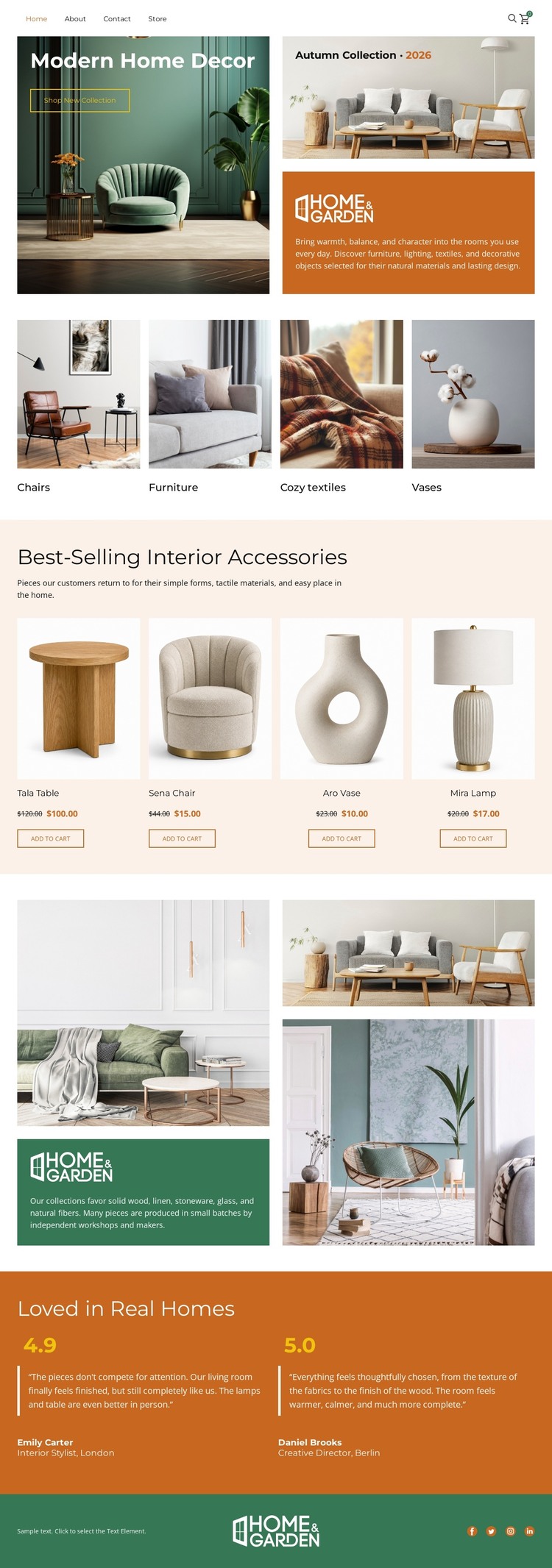
The opening photograph and Shop Now action establish the subject immediately, then the four category tiles give visitors a simple way to interpret the catalog by decor type. The page continues with four featured product cards for the Teak Table, Sena Chair, Ava Vase, and Mila Lamp. Because each card visibly combines an image, product name, price area, and Add-to-Cart action, the design already presents the essential relationship between product discovery and purchase intent rather than offering only a decorative homepage concept.
The Home & Garden split section broadens the page from product display into a lifestyle presentation, using an interior collage beside a colored brand message. Two rated testimonial blocks then add customer-oriented context before the compact footer with social icons. Together, these areas create a coherent standalone static arrangement: introduction, category browsing, featured products, editorial promotion, reassurance, and secondary navigation. The result can serve as a finished HTML page structure for a home furnishings presentation, while the sample names, prices, ratings, and review wording should be replaced with verified store content. Its strength is the completeness of the visible content path, not an assumption about hosting, export, or additional pages.
Customize with Nicepage
Open this ready-made template in the HTML Builder and customize it visually in the Nicepage editor. Replace demo content, edit page sections, and adapt the design to your project without rebuilding the template from scratch.
Export and Use This Template as an HTML Website
Create a Portable HTML Website
When the template is ready, use the HTML Export option to create a static website with the files required for deployment. The exported website can be used independently of the Nicepage editor and deployed on your preferred hosting.
Nicepage also provides SEO settings and optimization features, including Page Titles and Descriptions, Canonical settings, headings, image Alt Text, and other page-level properties that help prepare the website for search engines.
Deploy Without a CMS
Upload the finished website to the hosting environment that fits your project. Because the exported site does not require WordPress, Joomla, or another CMS to deliver its pages, it can be placed on your own server, uploaded to a hosting provider, or deployed through an existing web infrastructure.
Hand Off the Website Files
The generated website files can also be provided to a client, developer, or hosting team. They remain available outside the Nicepage editor for deployment, technical review, or project-specific development when additional work is required.
This workflow makes the template a practical foundation for a portable static website that can be exported from the Nicepage editor and deployed independently.

More from Interior HTML Templates
-
Free Website Builder SoftwareDownload