Valentines day sale HTML Template


A finished static section for a seasonal offer
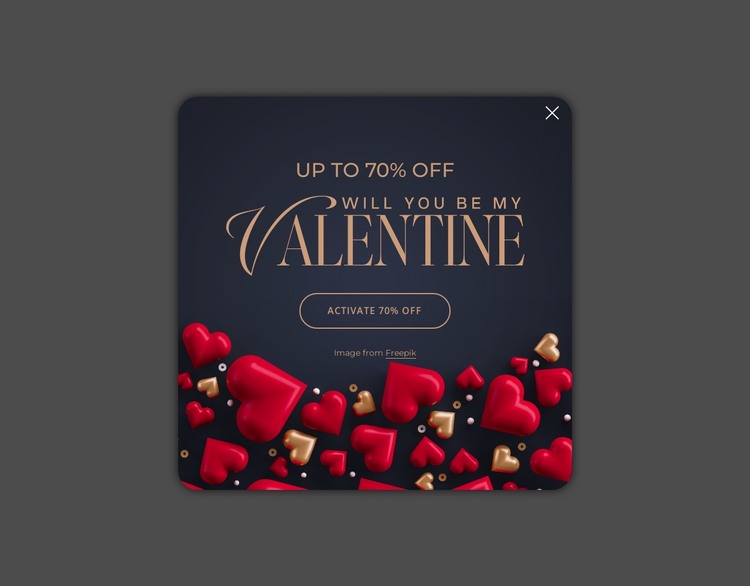
The centered card already combines the main ingredients of a compact seasonal promotion: an “Up to 70% Off” headline, Valentine-themed artwork, the “Will You Be My Valentine” phrase, an “Activate 70% Off” button, and a close control. The rounded navy surface and dimmed overlay give the section a clear modal identity, while the vertical stacking keeps the message, image, and response point in a readable order. It can therefore function as one prepared promotional area rather than a collection of unrelated elements.
Inside a static HTML page, this section can sit above or alongside other content when a project needs a temporary-looking offer presentation. The surrounding page remains responsible for its own navigation, content, and broader layout, while this block handles the focused seasonal message. The close control preserves the dismissible behavior represented by the section, and the action button provides a defined destination or response point when connected to the containing project’s offer workflow.
The visual treatment can be adapted to match the static page without losing the card’s central hierarchy. The navy background, copper-gold type, outlined button, and heart imagery are especially useful when the promotion needs to remain visually separate from the content underneath. HTML export can apply to the containing project, while this object remains one ready-made static section within it.
Customize with Nicepage
Open this ready-made template in the HTML Builder and customize it visually in the Nicepage editor. Replace demo content, edit page sections, and adapt the design to your project without rebuilding the template from scratch.
Edit Template Offline
2. Create a new page or select existing
3. Click Add new block, search for id 6548451 and click enter
Edit Template Online
Create Awesome Websites


Free Nicepage Builder
Keywords
Use This Block in a Static HTML Page
Start With a Ready-Made Section
A block provides one prepared content area that can be combined with other sections to build a static HTML page. Customize its text, images, spacing, colors, and other elements in the Nicepage editor while keeping the block focused on its own purpose, such as services, testimonials, pricing, contact information, or visual presentation.
Export the Containing HTML Project
When the page or website that contains the block is ready, use HTML Export to create the files required for a static HTML project. The export applies to the containing page/site rather than turning one individual block into a complete website by itself.
Reuse the Section Within the Project
The same block design can be adapted as one content section within a larger static site. Other Blocks can provide navigation, introductions, portfolios, forms, footers, and additional page content while this section keeps its own verified content and layout role.
This workflow makes the block useful as a ready-made section inside a static HTML implementation, with export and deployment handled at the page or website level.