Design during construction HTML Template


Edit Template Offline
2. Create new page and search for id 6001703
Edit Template Online
Create Awesome Websites


Free Nicepage Builder
Keywords
Project Stories Within a Complete Architecture Page
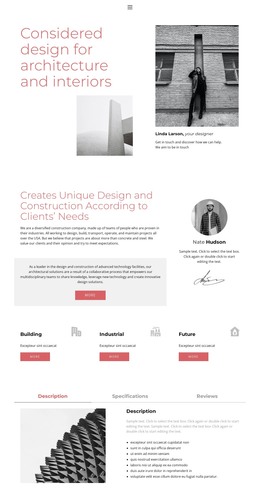
The opening section gives the page a clear introduction to the practice by pairing the heading “Considered design for architecture and interiors” with architectural imagery and a designer profile. The following practice overview adds explanatory content and a highlighted text panel, so the page is not limited to a visual portfolio. It establishes context before visitors reach the three service cards for Building, Industrial, and Future.
The tabs extend the static presentation with Description, Specifications, and Reviews areas beside an architectural image. This creates a compact way to group related information without requiring separate pages, while the Projects accordion provides three expandable entries: Sea luxury apartment, Business objects, and Office center. These project items give the design a practical portfolio structure, even though their sample names should be replaced with verified project content.
As a standalone HTML implementation, the template already brings together introduction, service coverage, project presentation, value statements, and contact content. The second accordion adds six numbered value propositions, and the Location panel supplies a visible closing contact point with an address and telephone link. The dark footer then provides a defined endpoint for the page. Together, these sections form a finished static arrangement that can carry a complete architecture-focused presentation rather than serving only as a visual concept.
Customize with Nicepage
Open this ready-made template in the HTML Builder and customize it visually in the Nicepage editor. Replace demo content, edit page sections, and adapt the design to your project without rebuilding the template from scratch.
Export and Use This Template as an HTML Website
Create a Portable HTML Website
When the template is ready, use the HTML Export option to create a static website with the files required for deployment. The exported website can be used independently of the Nicepage editor and deployed on your preferred hosting.
Nicepage also provides SEO settings and optimization features, including Page Titles and Descriptions, Canonical settings, headings, image Alt Text, and other page-level properties that help prepare the website for search engines.
Deploy Without a CMS
Upload the finished website to the hosting environment that fits your project. Because the exported site does not require WordPress, Joomla, or another CMS to deliver its pages, it can be placed on your own server, uploaded to a hosting provider, or deployed through an existing web infrastructure.
Hand Off the Website Files
The generated website files can also be provided to a client, developer, or hosting team. They remain available outside the Nicepage editor for deployment, technical review, or project-specific development when additional work is required.
This workflow makes the template a practical foundation for a portable static website that can be exported from the Nicepage editor and deployed independently.